Theme editor

Scale Model Shop

I need some PC help

stillp

SMF Supporters
Joined
Nov 17, 2016
Messages
8,325
Reaction score
312
Points
83
Location
Rugby
1/3
Thread owner
For a few weeks I was unable to log into my John Lewis account. Any attempt to log in produced a black bar across the login form. After a lot of digging around in various settings, I found a page that listed all the web sites I use, with a list of cookies for each one. One of the cookies for John Lewis looked "odd", so I deleted it - problem solved.
However I've now found the same problem occurring on the Ford website, but I can't remember how to find that list of websites and their associated cookies! Anyone know how to access that list please?
I'm using Chrome on Windows 10.
TIA
Pete
 
chrome://settings/content <<< type that into address bar , and work from there.

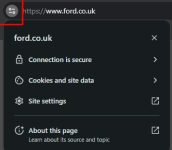
or , load the website with the problem
click on the funny two circles and two lines before webpage address
ford.png - ford webpage header/address bar
 
Thread owner
Thanks Gary. I thought there were a couple of dodgy entries under "Cookies and site data" but deleting the site data for Ford made no difference. When I go to the Ford login page my username and password are there but the page is greyed out.
I need to log in to download a software update.
Pete
 
Thanks Gary. I thought there were a couple of dodgy entries under "Cookies and site data" but deleting the site data for Ford made no difference. When I go to the Ford login page my username and password are there but the page is greyed out.
I need to log in to download a software update.
Pete

it may be it is using something to generate the page that your computer doesn't like. ( could be javascript running )
Some anti-virus can interfere with some websites.
I use Opera-GX for 99% of my web browsing now , it works on all the websites I use , or , there's a fast update if something new breaks one.

Greyed out page often means a popup or popunder was launched but settings on your computer forbid it , so you can't click on a acknowledgement , and page is never generated for you..

Try accessing the page in INCOGNITO mode ( cntrl+shift+N )
 
Last edited:
Thread owner
Thanks Gary, I'll try that tomorrow.
Pete

Edit: just tried in incognito mode, and it worked! Thanks again Gary.
 
Last edited:
Back
Top