
HI GUYS AN GALS now my question is it possible to colouries the coursor arrow on my pc as its white an i keep loseing it on this white background so a coloured arrow would be nice
chris
chris





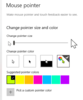
COR CHEERS Chris many thanks for the info i'll have a go as im not that good at working settings in my pc but just got to hope i dont balls it all upAssume you're on windows 10, but if not should be similar.
Go to settings:
Then devices:
Mouse settings:
Change your settings.
HI AGAIN Chris no i do not want to go back to how it was once ive changed the mouse coulor i mean will the pc just come out of settings so ready to use or will i have to press any more settings or such if you see what i mean as remember ive never used setting on my pc an im rubbish at computers as i saidNo problem at all, glad to help!
To reset, just go through the same steps and change it back.
Oh right, sorry. I misunderstood.
The change will take effect immediately and you won't need to restart. Just close all the settings windows and carry on!
No bother at all.
You can also set an option in Windows so that if you hit the Ctrl (Control) key, it shows you where the mouse pointer is:one nice big mouse arrow an in purple brilliant now i dont have to keep searchin for it

scalemodelling.co.uk is a privately operated online discussion forum. All content posted by members reflects their own views and opinions and does not necessarily represent those of the forum owners or administrators. While reasonable efforts are made to moderate content, no responsibility is accepted for user-generated material. By using this site, you agree to comply with UK law and the forum rules.