
Theme editor

Scale Model Shop

Instrument panel help

Status
Not open for further replies.

Matt.

New member
Joined
Dec 29, 2018
Messages
96
Reaction score
0
Points
0
1/3
Thread owner
Hi, i’m Making slow progress on mosquito and about to start the cockpit.
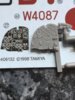
Not having or wanting to purchase PE items I’m wondering what most would do on the instrument panel. File the surface flat and apply decal or try and set over the raised instruments, I’ve applied over the raised instruments in the past but never got it perfect. Or does anyone try and paint instead of decals?Any feedback appreciated. MattA70E62B4-3B14-489E-BDBC-BA63C1B74104.jpeg
 
I normally paint the panel black and drybrush silver very lightly. Seems to look better than decals and alot easier.
 
Gloss black and invest in the micro twins (set & sol). Applied correctly the decal will be pulled down over the raised details.
The gloss helps reduce silvering and gives a good smooth surface to adhere to.
A quick coat of matt varnish to seal and you’re done.
 
I’d go for paint. Either paint the panel black and drybrush with dark grey, or paint it dark grey and apply a black wash (I’d go for the latter, I think); in either case, then paint the edges of the dials and other details white with a fine brush, using the decal as a guide.

Don’t paint the panel lines white, though, unless you can find a photo of a real Mosquito cockpit that shows them to be white — I get the impression they’re white on the decal mainly to show the edges of the panels, which painting as I described will do already.
 
Thread owner
Thanks for the suggestions, not sure which I will do but help really appreciated, I’d completely forgot about drybrushing. Thanks
 
Status
Not open for further replies.
Back
Top