Theme editor

Scale Model Shop

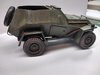
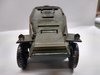
BA-64 1/35 scale Russian Armoured Car .

  • Thread starter Thread starter Guest
  • Start date Start date
Status
Not open for further replies.
Thread owner
Good boy. Now go quietly back to your cell and continue with your excellent model.

Kind Regards.
570
:tongue-out2:..........................:smiling2::smiling2: thanks 570 .:blow-kiss-2:

Don't be silly - he is the driving instructor - on loan of course....
Why didn't I think of that ! good answer.

I will not tell - honest....... 453 has got a German driving a Russian jeep - hostage situation....
Ssssh !:flushed::surprised:

Cut the decals into parts and just add some of them - looks more aged then.
Otherwise a good job, did not notice the missing decals, who did to be honest.
Mike.
Thanks Mike.

John, where you are going to place the decals just put a thin coat of gloss enamel let it dry then gloss the decal again when dry then apply your matt finish of choice.
Right Paul. gloss enamel, god job you said that I though it was always acrylic over the oil washes !
I have been watching from afar mate. As you know I am the last person to give you advice on figures. Plenty of people here who can do that for you. I am just impressed how you are coming on leaps and bounds with the figures. Once you struggled with painting faces, now its - how is the best way to sculpt them. Wont be long before you will be giving Peter G a run for his money. I am so pleased with your effort to stay as true as possible to the photo. Outstanding work sir. Looking forward to seeing everything in place.
Steve very kind of you to say, its been a struggle, but now everything although a challenge is do able, just takes as we well know practice.


One thing I would like to know is how do I get the photo that Steve suggested in the first place printed off. Ive tried to copy and paste but as its not in a J -peg file I cant send it to word then print.I want to stand the picture next to the model.

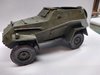
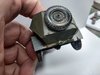
Some photos if today's work.IMG_20190404_182646964.jpgIMG_20190404_182724483.jpgIMG_20190404_182802372.jpgIMG_20190404_182852772_HDR.jpgIMG_20190404_182859407_HDR.jpgIMG_20190404_182906212_HDR.jpgIMG_20190404_182934026_HDR.jpgIMG_20190404_183039859.jpg


Thanks for the support, car is drying ,so will give it a couple of days in the house to dry.
John.
 

Attachments

  • IMG_20190404_182656902.jpg
    IMG_20190404_182656902.jpg
    1.6 KB · Views: 0
Just caught up JR and you have been busy. You've really kicked this one into submission. Your figure work has definitely improved massively.
 
Thread owner
Just caught up JR and you have been busy. You've really kicked this one into submission. Your figure work has definitely improved massively.
Cheers Mick, been a struggle but finding the right mix of paint/water has been the thing that has helped most.
John.
 
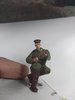
Nice looking figs. JR, the one behind the car appears to be demonstrating the Rooskie version of the peppermint twist! :tongue-out2:Lol !!

Cheers, Rick H.
 
Thread owner
that looks tiny for 1/32 i would go crazy nice work so far
Rick
 
Thread owner
Nice looking figs. JR, the one behind the car appears to be demonstrating the Rooskie version of the peppermint twist! :tongue-out2:Lol !!

Cheers, Rick H.
Rick :smiling2:I agree, he looks better standing in the back. This is what happens when you marry up odd bits !!

I've sent you the original as a jpeg via your email mate. Hopefully that will work for you
Cheers Steve , thank you .:thumb2:
It's looking the biz John!
Neil .
Thank you, praise indeed..
that looks tiny for 1/32 i would go crazy nice work so far
Rick
Thanks Richard , actually 1/35 but not that much difference I'm sure.
John .
****


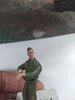
Now my dear friend young Steve has kindly sent me the photo I can get it printed off, laminated and ready to put along side the Dio when it's finished .Top Man !
Tonight I was looking at the car and noticed the colours from the oil washes have all faded ? So more repeats I think ?

John.
 
I thought he was demonstrating his Fonz impression :smiling:

Has the anti tank gunner lost a left thumb John?
 
Thread owner
Hi John I know you have almost finish this one but if you do another one how about this.


Pete.
 
Thread owner
:tongue-out2:..........................:smiling2::smiling2: thanks 570 .:blow-kiss-2:


Why didn't I think of that ! good answer.


Ssssh !:flushed::surprised:


Thanks Mike.


Right Paul. gloss enamel, god job you said that I though it was always acrylic over the oil washes !

Steve very kind of you to say, its been a struggle, but now everything although a challenge is do able, just takes as we well know practice.


One thing I would like to know is how do I get the photo that Steve suggested in the first place printed off. Ive tried to copy and paste but as its not in a J -peg file I cant send it to word then print.I want to stand the picture next to the model.

Some photos if today's work.
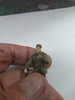

Thanks for the support, car is drying ,so will give it a couple of days in the house to dry.
John.
Hello John,
Try this, converted to jpeg.

Cheers, Mike.
 
Thread owner
I thought he was demonstrating his Fonz impression :smiling:

Has the anti tank gunner lost a left thumb John?
Yes! Refused to hold the gun as asked, no second chances given ! :smiling2::smiling2::smiling2:
Hello John,
Try this, converted to jpeg.

Cheers, Mike.
Thanks Mike, how did you manage to do that please.
John.
 
Thread owner
Yes! Refused to hold the gun as asked, no second chances given ! :smiling2::smiling2::smiling2:

Thanks Mike, how did you manage to do that please.
John.
Right clicked on the image, and saved it to the desktop as whatever the numbers were in the first line and then changed from png to 'all files'. I think it will come up as 'you will lose transparency' or something similar.
Then as i have lost my copy of photoshop, I am using windows paint, just open the file as normal and then save it as a jpeg - job done.
Cheers, Mike.
 
Thread owner
One thing I would like to know is how do I get the photo that Steve suggested in the first place printed off. Ive tried to copy and paste but as its not in a J -peg file I cant send it to word then print.I want to stand the picture next to the model.
I only just read this, else I would have replied earlier, but: you don’t need MS Word to print images. I take it you’re on Windows, so just open the file in either Paint or Windows Photo and tell that you want to print it out.

(On a Mac, drag the image from the web page onto your desktop, double-click it there to open it in Preview, and you can use that to print it out. Or, if Preview is already in your Dock, drag the image from the web page directly to Preview’s icon, bypassing the desktop entirely.)
 
Thread owner
I only just read this, else I would have replied earlier, but: you don’t need MS Word to print images. I take it you’re on Windows, so just open the file in either Paint or Windows Photo and tell that you want to print it out.

(On a Mac, drag the image from the web page onto your desktop, double-click it there to open it in Preview, and you can use that to print it out. Or, if Preview is already in your Dock, drag the image from the web page directly to Preview’s icon, bypassing the desktop entirely.)
Thanks Jakko
I only use the Canon program for my photos, but Christine had download it as you have said .All is good :thumb2:
 
Thread owner
Right clicked on the image, and saved it to the desktop as whatever the numbers were in the first line and then changed from png to 'all files'. I think it will come up as 'you will lose transparency' or something similar.
Then as i have lost my copy of photoshop, I am using windows paint, just open the file as normal and then save it as a jpeg - job done.
Cheers, Mike.
Thanks Mike.
 
Thread owner
Hi John I know you have almost finish this one but if you do another one how about this.


Pete.
Pete, I think you are attempting to get me to do those tracks !!! Does look ok, what make and scale please.
John
 
Thread owner
Well I just posted and its gone !! stand by for incoming
 
Thread owner
Right, where they went is beyond me, firstly thanks to Steve , Mike and Jakko.
for they help with the Jpeg.!! :thumb2::thumb2::thumb2:.


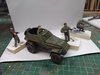
IMG_20190405_182448292.jpg
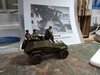
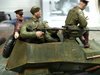
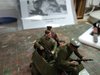
As good as I can match the photo


IMG_20190405_182537716.jpg

IMG_20190405_182526227.jpg


IMG_20190405_182505788.jpg

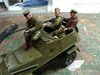
Really pleased with the figures this time, finished them off with a Vallejo wash as Tim had advised me to use.

All comments gratefully received,including abuse from Rabble Members.
John.
 
Status
Not open for further replies.
Back
Top