Theme editor

Scale Model Shop

Cockpit detail

Ancientmariner

New member
Joined
Feb 11, 2018
Messages
867
Reaction score
20
Points
0
1/3
Thread owner
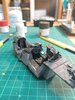
Hi all, after a lot of air brushing I wanted to use hand and brush and get a bit of time at it.
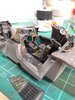
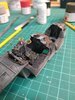
Dug out a 1/32 F-14 with cockpit detailing set and started off. Nice working on something big as I have never done a 1/32 kit before.
Back seat area is almost done but I'm wondering how to add colour to control panels without making it look like dabbed on paint if that makes sense?
Any feedback and tips to improve are appreciated.
 

Attachments

  • IMG_20210124_184600.jpg
    IMG_20210124_184600.jpg
    3.5 KB · Views: 0
  • IMG_20210124_184542.jpg
    IMG_20210124_184542.jpg
    3.5 KB · Views: 0
Hi James. If you are talking about painting the raised switches etc, I would use the side of the brush rather than the tip. You will get more control that way.
 
A top tip I was given for demarcation lines between the various panels is to use a clay based wash (white or grey). It can be brushed over the entire pane, and when dry removed from the switch areas with a damp cotton bud. Being a clay wash it comes right off.
 
For knobs and switches I find paint pens are ideal. The brand I use are Posca and they have some good colours.
 
add colour to control panels without making it look like dabbed on paint
I find that standard colours, straight out of the bottle are too bright. I dull red, yellow and white down a touch with a bit of grey. For applying, I normally use my all purpose needle.
 
Back
Top