Theme editor

Scale Model Shop

Laser Printing Decals

  • Thread starter Thread starter Guest
  • Start date Start date
Status
Not open for further replies.
G

Guest

Guest
Thread owner
So I'm looking to custom print some decals, and from what I can gather laser is preferable to inkjet for them. However my local print shop is cautious about using decal paper because they're concerned the plastic layer of the paper melting in the printer's heating element and damaging the machine. From what I can gather, this can happen (look at the first couple of reviews here) and I don't want to damage their printer or be left with a hefty repair bill. Can anyone recommend any particular brands of decal paper or methods of printing to ensure that this won't happen?  Is there any advice that people can give me about printing them?
 
I understand you want to go the Laser route, but why not try inkjet and see if they are good enough. I've only printed decals once and admittedly, my inkjet does have trouble with lighter colours.
 
The advantage of laser over inkjet is you don't need to seal them after printing, you can get laser specific paper that shouldn't damage the printer. 


I have 3 sheets of A4 clear in stock that you can have for a couple of quid. 
 
Thread owner
I understand you want to go the Laser route, but why not try inkjet and see if they are good enough. I've only printed decals once and admittedly, my inkjet does have trouble with lighter colours.

Thanks for the input, though I've tried inkjet on my home inkjet printer and the print quality was awful. Plus I'm planning to use micro sol solution to soften the decal onto the surface and the inkjet sealant I have seems to block that from getting to the decal itself. Unless you have some good advice for solving those problems then I'd happily use inkjet but as far as I can tell laser seems to be the way to go.

The advantage of laser over inkjet is you don't need to seal them after printing, you can get laser specific paper that shouldn't damage the printer. 


I have 3 sheets of A4 clear in stock that you can have for a couple of quid. 

Thanks for the offer, but my print shop won't print them unless I can get some sort of confirmation that it won't cause any issues. Getting the paper itself seems to be a secondary issue right now.
 
Thread owner
Laser - ? - Absolutely no way...


I've been printing decals for over 10 years.
Inkjet are infinitely better in colour and resolution.
Laser are very poor by comparison.


OK - Laser need no clearcoat but they are dull and quite fuzzy by comparison.
I have a £600 HP laserjet pro and the decals from it can't touch those from my little £80 HP Deskjet 1000.


I print decals for model cars and text of less than 0.5mm on engine decals is completely sharp and fully readable under a lens.
With the laser, the text is just a blurry line.


Inkjet colours are sharp and vibrant
Laser are dull and washed out.


I coat my inkjet decals with Plastikote clear gloss varnish and they are excellent.


All of the decals on my Lotus F1 conversion (Revell Ferrari base) are inkjet, created by me. They are razor-sharp. (Sorry the pics are a bit naff - old cheapo camera at the time)


Nope - sorry. Inkjet for decals every time.


View attachment 261189


View attachment 261188
 
Thread owner
That's interesting. My inkjet printer is a Canon MX920 which seems to be fairly decent, and the prints I get out of it are in awful quality. I get white printer lines left and grainy parts. Not tried laser yet though so can't comment first hand.
 
Thread owner
Thanks for the information. I've also got a couple of concerns about printing. I've come across a couple of instances where four-pass colour printers warp or deform the decal paper or damages the printer. Is it worth specifically going for a single-pass printer out of it?  
 
Thread owner
Laser - ? - Absolutely no way...


I've been printing decals for over 10 years.
Inkjet are infinitely better in colour and resolution.
Laser are very poor by comparison.


OK - Laser need no clearcoat but they are dull and quite fuzzy by comparison.
I have a £600 HP laserjet pro and the decals from it can't touch those from my little £80 HP Deskjet 1000.


I print decals for model cars and text of less than 0.5mm on engine decals is completely sharp and fully readable under a lens.
With the laser, the text is just a blurry line.


Inkjet colours are sharp and vibrant
Laser are dull and washed out.


I coat my inkjet decals with Plastikote clear gloss varnish and they are excellent.


All of the decals on my Lotus F1 conversion (Revell Ferrari base) are inkjet, created by me. They are razor-sharp. (Sorry the pics are a bit naff - old cheapo camera at the time)


Nope - sorry. Inkjet for decals every time.


View attachment 261189


View attachment 261188
How things can be different for several people. Inkjet printers print nice but the colours fade easily and are not very accurate besides needing a coating. Laser printers get absolutely accurate colours and they don't easily fade. My local printing store has a RICOH brand big laser printer. I use "World-Paper.com" brand papers. Top quality, cheap and it does not damages the printer. I Photoshop all my decals designs and I always save in CMYK for accuracy. Don't save in RGB. The only disadvantage I see on Laser printers is that they are extremely expensive and are not easily affordable for home hobby printing and sometimes is not convenient to travel long distance to print a small decal.
 
Thread owner
I pr0duced some inkjet decals for the first time recently and they look good. Very sharp. At first I responded to a warning by the paper suppliers not to put too thick a coat of acrylic varnish on them, or they might not soak off the backing. Two light coats (as instructed) and the colour (including black text) ran a little and the text has a pink tinge. So, three coats or more next time. Need to practice.
 
Thread owner
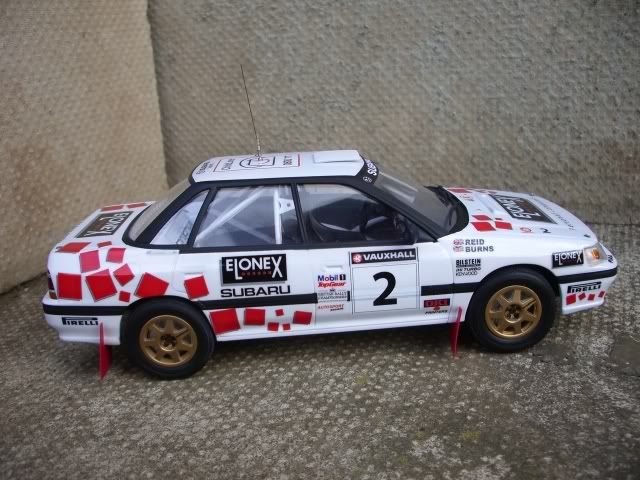
All decals on this Subaru were laser printed. The printer will not be damaged by laser decal paper. Colours are bright and the quality is perfect. No need to seal the decals either before use..

Subaru068.jpg
 
Status
Not open for further replies.
Back
Top