

You are using an out of date browser. It may not display this or other websites correctly.
You should upgrade or use an alternative browser.
You should upgrade or use an alternative browser.
Latest Acquisitions (2018)
- Thread starter John
- Start date
- Status
- Not open for further replies.

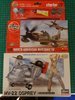
A couple of additions for the upcoming GB's:
View attachment 323016
As I never got round to buying these when I was a kid, couldn't let them stay at the shop:
View attachment 323017
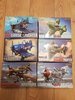
This half squadron made it from China in two weeks, forgot to order the Bf 109 then so that's still in transit:
View attachment 323018
The tri-color Corsair will be left for the future but the rest are for the Toon GB.:tongue-out3:
View attachment 323016
As I never got round to buying these when I was a kid, couldn't let them stay at the shop:
View attachment 323017
This half squadron made it from China in two weeks, forgot to order the Bf 109 then so that's still in transit:
View attachment 323018
The tri-color Corsair will be left for the future but the rest are for the Toon GB.:tongue-out3:
Attachments
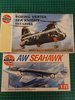

had to go into Aldi for something and they had restocked with cheapo Airfix Starter kits.....added another 2 to the stash


wish i had realised how good the jeep kit is cos i might have got more than one!
wish i had realised how good the jeep kit is cos i might have got more than one!
G
Guest
Guest
You are going to be a very busy boy, very nice haul indeed.A couple of additions for the upcoming GB's:
View attachment 323016
As I never got round to buying these when I was a kid, couldn't let them stay at the shop:
View attachment 323017
This half squadron made it from China in two weeks, forgot to order the Bf 109 then so that's still in transit:
View attachment 323018
The tri-color Corsair will be left the future but the rest are for the Toon GB.:tongue-out3:
Pete.
Pete.
Absolutly Pete, they are great to try out some colours I have before the intended subject gets a coat and some simple building is good from time to time.:smiling4:You are going to be a very busy boy, very nice haul indeed.
Pete.
Pete.
G
Guest
Guest
I built the non-airborne version a couple of years ago, and I was very impressed. As I recall, it’s apparently the same as (or a rebox of) the Heller kit, but I haven’t seen that.wish i had realised how good the jeep kit is cos i might have got more than one!
G
Guest
Guest
Once it’s on the forum, you can’t.
On the phone, there’s likely an app in which you can view the photos and do basic adjustments like turning it around. No idea what phone you have, but on an iPhone (or iPad or iPod Touch), once you’ve taken a picture you can tap on the little square preview of it at the bottom right and you’ll be able to browse through all the photos you’ve taken. There’s an edit button (though note it might have a different name in English) at the top of the screen that you can tap to adjust the photo, for things such as cropping, turning it, adjusting the horizon, altering colour balance, and more. The camera or photo viewer apps on Android phones probably have similar capabilities, but I wouldn’t know :smiling3:
Chances are that when you took the photo, you were holding the phone more or less horizontal, so that it couldn’t tell which way is up (smartphones know which way is up if you hold them anything but approximately horizontal). In this case, the solution is to look closely at the screen to make sure that any text (like the clock at the top, if there is one) is the right way up for you. If not, hold the phone more vertical until the display turns the right way up, then tilt it downward again to take the photo.
That last one is the best way to do it, because it means you don’t have to tinker with the photos after taking them.
Jakko....... thanks, think you have it in one, phone being in that horizontal position. Its a Motorola play 6, of course this means nothing to me ! All I wanted was a phone not a control center :smiling5:. I shall have a play. Thanks for the help.
John.
G
Guest
Guest
Luckily that’s easy enough to solvethink you have it in one, phone being in that horizontal position.

Or meIts a Motorola play 6, of course this means nothing to me !
I’m pretty much entirely not up to speed on mobile phones at all. But as you say, play around a bit and you should be able to work out how to take pictures the right way up soon enough. i hope 
I have the same phone John, and I don't think there's any way to rotate the photos in the camera after they've been taken.Jakko....... thanks, think you have it in one, phone being in that horizontal position. Its a Motorola play 6, of course this means nothing to me ! All I wanted was a phone not a control center :smiling5:. I shall have a play. Thanks for the help.
John.
Pete
G
Guest
Guest
Hi this arrived this morning all the way from China in 8 days, one more for the GB.View attachment 323201
Pete.
Pete.
G
Guest
Guest
Is that Bobby Kennedy’s private plane?
G
Guest
Guest
Thanks Pete............. Might be back to the DSLR then . Mind you I think the photo quality is good.I have the same phone John, and I don't think there's any way to rotate the photos in the camera after they've been taken.
Pete
John.
G
Guest
Guest
If the phone has Google Photos on it, follow these instructions. (If it doesn’t have that app, you can install it easily.)
Thanks Jakko, the manual for the phone doesn't include the Rotate instruction, but yes, that works.If the phone has Google Photos on it, follow these instructions. (If it doesn’t have that app, you can install it easily.)
Pete
G
Guest
Guest
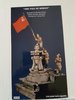
well look a package all the way from home,yes the UK,
and guess whats in the box,????? :hugging-face:
something I,have wont to do for such a very long time,
i know that Danny has left us,but still a very big thank you to him,for not just finding one,but two,wow :smiling:
was over the moon when he said he has one for me,big hugs to a great man,
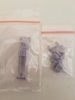
the second is a 1,35 school girl figure that I,plans to use in a dio,with two other great figures I,had for some time,
and guess whats in the box,????? :hugging-face:
something I,have wont to do for such a very long time,
i know that Danny has left us,but still a very big thank you to him,for not just finding one,but two,wow :smiling:
was over the moon when he said he has one for me,big hugs to a great man,
the second is a 1,35 school girl figure that I,plans to use in a dio,with two other great figures I,had for some time,
Attachments
-
 20181220_152308.jpg2.8 KB · Views: 0
 -
 20181220_152300.jpg1.2 KB · Views: 0
 -
 20181220_152256.jpg1.6 KB · Views: 0
 -
 20181220_152211.jpg2.2 KB · Views: 0
 -
 20181220_152207.jpg1.8 KB · Views: 0
 -
 20181220_152203.jpg1.8 KB · Views: 0
 -
 20181220_151712.jpg3.6 KB · Views: 0
 -
 20181220_151531.jpg2.6 KB · Views: 0
 -
 20181220_151140.jpg1.9 KB · Views: 0
 -
 20181220_152342.jpg1.6 KB · Views: 0
ty,Stephen,I,had been after it for years,until,,I saw the one Danny posted,and had a chat with,himThat is so lucky
I have bid on some really dubious Chinese bad copies but lost.
It is such an iconic moment along with Iwo Jima
I am so jealous have fun with it
Steve H
about it,said he would keep an eye for,me,so so very happy when he did find it,
only one thing I,m going to add and thats two or more watchers ,on the chap with the flag lol,:smiling:
- Status
- Not open for further replies.
Legal Notice
scalemodelling.co.uk is a privately operated online discussion forum. All content posted by members reflects their own views and opinions and does not necessarily represent those of the forum owners or administrators. While reasonable efforts are made to moderate content, no responsibility is accepted for user-generated material. By using this site, you agree to comply with UK law and the forum rules.