Theme editor

Scale Model Shop

Model photos the easy way

  • Thread starter Thread starter Guest
  • Start date Start date
Thread owner
For model photography, HDR is mainly useful if you have light things in the photo, that disappear in the glare — like in the example with a few bits of plastic card. Another situation in which it makes a good deal of difference is if you go outside and photograph something with the sun in the frame, whether directly or shining through a cloud:

View attachment 508162View attachment 508163

The first is normal, the second is HDR, taken less than a second apart.

As for your figure, I like the last, darker, picture better than the other two.
 
Thread owner
Thanks, guys :smiling3:


Those things shouldn’t take very long. After you’ve done it a few times you’ll known what to press and it’ll be very quick, but your photos will be much better for it :smiling3:


Thinking about it, it’s probably better than the little tripod, because with this arm I can get the light down to table level, instead of some distance above it, so I can take pictures horizontally if I want to rather than only diagonally from above. I’d consider it a worthwhile investment if you’ve got a ring lamp.
Of course being retired I've got the time,I've got a fold up booth, lights , just a pain to get it all set up. :confused:
 
Thread owner
Like I said earlier, if you’ve got the space to put it permanently, that’s much more convenient. Sure, the folding booths are intended as being portable, but if I had to set mine up every time I wanted to take some photos I wouldn’t be posting many on here, I know that :)
 
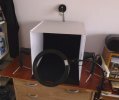
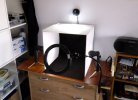
My goose neck holder for my ring light arrived. Good and solid for the price. As I said my set up is like Jakko's, two side lights and a down light, but having the ring light fixed is so much easier.
P1070661.JPG

P1070657.JPG

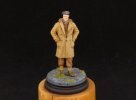
Seems to work very well. An early attempt at a stand alone figure.
P1070658.JPG

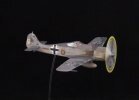
A plane which shouldn't have yellow prop tips but looks pretty!
P1070660.JPG

I also took onboard Jakko's suggestion to photograph from further away and then crop the image. I use a free programme called Paintnet.

Thanks Jakko.
 
Thread owner
That light on the wall is so much easier than my solution of hanging one of the spotlights from a bit of wire :)
 
Thread owner
As I bought a new iPad the other day, let me add a little bit to this thread concerning the differences between devices.

Here are three photos of a Jagdtiger:

View attachment 509302View attachment 509303View attachment 509306

The first was taken with my old iPad with HDR off, the second with HDR on, and the third with my new iPad. This has automatic HDR, so you can’t turn it on or off by hand, and it looks like the model in the third photo looks pretty similar to the second to me, while the first is slightly less saturated. Not really enough to make a noticeable difference, though. (The background is clearly different between the third photo and the other two, but the model itself not that much.)

But now look at this other Jagdtiger:

View attachment 509304View attachment 509305View attachment 509307

Again, first the old iPad without HDR, then with HDR, and then the new iPad. Once more, the first picture is a little less saturated than the second, but the third has far more colour saturation than I would like it to have :( I’m guessing this is because current iPads do a lot more colour processing than older ones (due to the extra horsepower available) and no doubt, this helps you take pictures that look much better of generic subjects like nature, people, street scenes, etc. — but it’s not to my liking for model photography. I haven’t found out how to stop it doing this, though, and I don’t really feel like having to manually adjust every photo after taking it …
 
Jakko, I'm afraid my eyesight is so bad that they all look the same to me :anguished:
 
Out of those Jakko, I feel the non HDR shots look best. In your first three the “old” IPad shot with HDR has slightly blown the highlights. In both cases the “new” IPad HDR pictures look horrible, with really over applied colour shifts. They just look like poor JPG shots where every slider has been pushed full up. Certainly not selling that device to me…..I’d have to colour correct them all, and as you know, that’s a slow process on an IPad. Just out of interest, have you tried them on a mid grey background? The dark background may be causing the over exposure that is evident in HDR.
 
Thread owner
I feel the non HDR shots look best.
I’m leaning to the HDR photos with the old iPad, but there’s not much between with and without in these, IMHO.

In both cases the “new” IPad HDR pictures look horrible, with really over applied colour shifts. They just look like poor JPG shots where every slider has been pushed full up. Certainly not selling that device to me…..
I had expected a lot better, I know that. It’s probably an indicator of what most people photograph with their phones and tablets — that is, not scale models :) I want to try other camera apps, but all of those I’ve found so far on the app store are subscription-based, and I refuse to pay for software-as-a-service when they’re just delivering me a product. (If they were offering some actual service, like cloud-based storage, a multi-player online game, or something like that, then sure, I’ll pay a regular fee to be able to keep using it, but not for something that’s really just a single product that lives entirely on my iPad.)

I’d have to colour correct them all, and as you know, that’s a slow process on an IPad.
I’ve been playing with the pre-set filters, and it looks like a few of them change the colours enough to appear much more muted. I can live with applying a filter to photos, but I wouldn’t want to colour-correct each and every model photo by hand with all the different sliders available for that.

Just out of interest, have you tried them on a mid grey background? The dark background may be causing the over exposure that is evident in HDR.
I haven’t tried that, but I do intend to see what happens with different colours of background. I would have to find something to use as a neutral grey one, though — my only easy alternatives are white and blue.
 
I’m leaning to the HDR photos with the old iPad, but there’s not much between with and without in these, IMHO.


I had expected a lot better, I know that. It’s probably an indicator of what most people photograph with their phones and tablets — that is, not scale models :smiling3: I want to try other camera apps, but all of those I’ve found so far on the app store are subscription-based, and I refuse to pay for software-as-a-service when they’re just delivering me a product. (If they were offering some actual service, like cloud-based storage, a multi-player online game, or something like that, then sure, I’ll pay a regular fee to be able to keep using it, but not for something that’s really just a single product that lives entirely on my iPad.)


I’ve been playing with the pre-set filters, and it looks like a few of them change the colours enough to appear much more muted. I can live with applying a filter to photos, but I wouldn’t want to colour-correct each and every model photo by hand with all the different sliders available for that.


I haven’t tried that, but I do intend to see what happens with different colours of background. I would have to find something to use as a neutral grey one, though — my only easy alternatives are white and blue.
Blue or lilac might actually be a better background, certainly for colour balance. That way you are filling in the colour wheel when the subject is predominantly one colour like the yellow ones are.
I think the issue with the HDR shots is that the software tries to range the picture all the way from black to white, even if those tones don’t appear in the image. It would be interesting to see an exposure graph of those shots side by side with uncorrected ones. I bet all it does is spread the frequencies to fill the range of the graph.
 
Thread owner
Unfortunately, getting the uncorrected pictures out of the standard iPad camera app isn’t going to happen, AFAIK. But if I find a good alternative that can take RAW pictures, it might be worth experimenting with taking the same picture in both.
 
Thread owner
More experimentation, now with the background colour. I’ve done some more painting on the models, so they’re not the exasct same colour anymore as before, but I’ve now photographed the camouflaged Jagdtiger against four different backgrounds, and again, see for yourself:

View attachment 509741View attachment 509742View attachment 509744View attachment 509743

The black background is much as before (of course), while the medium grey background produces more muted colours, as does the blue. However, these both still distort the colours to a fair degree. The green is OK, but the brown is too dark and the dark yellow is much lighter than on the real thing. The white background gives probably the best colours compared to the model, except it’s too dark overall (which, of course, is to blame on the light background, which results in the camera app making the rest of the picture darker).
 
I’d say the mid grey has the best exposure of those shots, but that the jpeg algorithm is still messing with the colours.
 
Thanks for that test Jakko, it is very interesting how the camera reads the overall light, and then compensates in the end result for the differences.
It does however make it a bit of a minefield though for the average person.
 
Thread owner
I’d say the mid grey has the best exposure of those shots, but that the jpeg algorithm is still messing with the colours.
The camera app’s processing messes with the colours, not the JPEG algorithm. Here’s the “grey” photo with its background erased in Photoshop and different colours swapped in place, saved as JPEGs with a colour profile (sRGB IEC61966-2.1) included:

View attachment 509798View attachment 509799View attachment 509800View attachment 509801

When cycling through them in Quick Look, I don’t see any difference in the colours on the Jagdtiger itself. (You can do the same right here on the forum by clicking on one of the thumbnails above and then using the left and right arrows to the sides of the image to cycle through them.) If I open the digital colour meter, put the mouse cursor over a random spot on the Jagdtiger and cycle through the images, the colour values shown in the program don’t change at all.
 
Thread owner
it is very interesting how the camera reads the overall light, and then compensates in the end result for the differences.
This is a very useful thing if you’re taking generic photographs, of people, landscapes, etc. but not for the kind of semi-technical photography we do with models :(

It does however make it a bit of a minefield though for the average person.
And oddly, a lot more so than with my eight-year-old iPad … That also sometimes did things like this, but nowhere near as bad. I guess the latest hardware and software allows much greater adjustments to be done automatically. I just wish there was an easy way to turn that off …
 
The camera app’s processing messes with the colours, not the JPEG algorithm. Here’s the “grey” photo with its background erased in Photoshop and different colours swapped in place, saved as JPEGs with a colour profile (sRGB IEC61966-2.1) included:

View attachment 509798View attachment 509799View attachment 509800View attachment 509801

When cycling through them in Quick Look, I don’t see any difference in the colours on the Jagdtiger itself. (You can do the same right here on the forum by clicking on one of the thumbnails above and then using the left and right arrows to the sides of the image to cycle through them.) If I open the digital colour meter, put the mouse cursor over a random spot on the Jagdtiger and cycle through the images, the colour values shown in the program don’t change at all.
Yes, but the device shoots in RAW and then processes and saves them originally using a JPEG algorithm before you view them Jakko. It’s what separates these devices from SLR cameras. On my good camera I can shoot in RAW (unprocessed) and then do post photo processing in a program such as lightroom. All moot these days though, using the iPad as a point and shoot is far easier for web posting such as this.
 
Thread owner
Yes, but the device shoots in RAW and then processes and saves them originally using a JPEG algorithm before you view them Jakko
If we’re being precise, then Apple devices store the images as HEIC files internally, and only export to JPEG for things that want JPEG but not HEIC. This format may use JPEG compression, but not necessarily — and I don’t know what iPadOS does in this regard. In any case, my point is that the colour shift is not due to JPEG compression algorithms but due to the camera app’s processing of the raw image data it gets from the CCD.

The way JPEG compression works does mean that it will change the colours of pixels in the image, but not in response to the overall image tone — rather, for each 8 × 8 pixel block in the image, it will tinker with the colours that are least prevalent in that block, in order to compress the block more efficiently.
 
Back
Top