Theme editor

Scale Model Shop

Eduards shiny decals.

Watto

New member
Joined
May 15, 2024
Messages
62
Reaction score
13
Points
0
1/3
Thread owner
First of all, apologies for asking what I'm sure is a talked about subject but, I'm new here and that's my excuse...

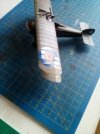
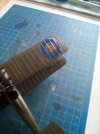
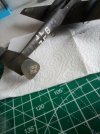
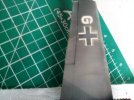
I've recently carefully placed the decals into my Me 110 by Eduard and they look awful, despite the use of setting solution, over spraying with clear coat, they still shine like the morning sun and the extra backing around them looks like silver foil!

I've watched videos, and read articles but, nothing seems to work for me like it either shows or describes.

apologies again for what I'm sure is a frequently asked question as; What airbrush should I buy? but, I'm sure someone will have a solution to what must be a common problem.

Thanks in advance for any suggestions,

Watto.
 
Ideally you would gloss clearcoat before applying the decals this will help them go down better and help eliminate the silvering around the decal
 
I have not used the new style Eduard decals, but my understanding is they have an additional layer that can be removed. I believe there are some videos around on how to do it.
 
It does sound like 'silvering' Post a picture, then we'll know for sure.
 
I have not used the new style Eduard decals, but my understanding is they have an additional layer that can be removed. I believe there are some videos around on how to do it.
They do, but they still act like (very good) normal decals if you don’t. I did an SBS on it somewhere when I built my zero for the Japanese aircraft GB ;)
Biggest thing to be aware of is that it’s only viable for decals printed after a certain date….
 
Could you post a picture Watto. There are some ways to improve silvering, but it would be good to see the problem before diving in with advice.
 
Thread owner
Could you post a picture Watto. There are some ways to improve silvering, but it would be good to see the problem before diving in with advice.
Hi Tim, I'll get a couple of pictures taken and post them in the next couple of days

Watto.
 
Thread owner
First of all let me apologise for the quality of the pictures, I was in a bit of a rush and took them on my kindle. I hope you can see what I mean? I have overs sprayed them and have started some basic weathering but the backing film is still very evident, albeit a little less shiny. When I first applied them, they were as glossy as the ones on the Camel.

I know it's possible to remove the film but, SO far all efforts have left me with damaged decals.

Thanks in advance for any advice given.

Watto.

IMG_20240521_141823.jpgIMG_20240521_141811.jpg

IMG_20240521_141033.jpgIMG_20240521_141109.jpg
 

Attachments

  • IMG_20240521_141126.jpg
    IMG_20240521_141126.jpg
    4.2 KB · Views: 0
Definitely decal “silvering”, as it’s called, I’m afraid Watto. It happens when air gets trapped under the decal. If you think about it, a matt paint surface isn’t smooth. It’s comprised of a very rough surface made up of many microscopic peaks and troughs. The air gets trapped in the troughs and the decal sits on the peaks, leading to the mirror effect you can see. It is much more noticeable on the clear parts of the decal. The shiny effect on the camel is probably the decal itself. Not all aircraft finishes are matt, some were gloss, so the decals may be made that way on purpose.

It’s usually good practice to varnish decals afterwards because they can be quite fragile, especially if you are going for a weathered finish. The varnishing should tie the glossyness into the over all finish making the paint and decals have pretty much the same sheen.

Now you’ve overvarnished them, I’m afraid there isn’t that much you can do to correct it. If they were still as applied, a coat of decal fix may have made them settle a bit better. Some Eduard decals can be peeled to remove the carrier film, but it is very much dependent upon the date they were printed. Both of these are older kits, so may have older decals, so I wouldn’t risk it. Anything after 2020 should be fine.

I did a quick step by step on them here
https://www.scale-models.co.uk/threads/eduard-removable-cover-film-decals.42186/

For your next model you will probably get better results by following this regime;

  • paint model
  • gloss varnish model
  • add decals
  • use decal fix to settle the decals properly onto the surface
  • varnish model to desired finish. Personally I go for semi gloss on aircraft and Matt on ground vehicles.
  • weather model to taste

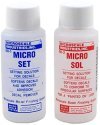
If you are unsure what decal fix is, I use these.
IMG_0894.jpeg
The blue one is painted on the model before the decal is applied and helps it slide around so it can be more easily placed.
The red one is painted on after the decal has dried. You will see the decal swell and distort a bit. Dont touch it because it will be very soft. As it dries it will shrink back to size, and will conform better to the surface underneath.

Hope this helps
 
Thread owner
Definitely decal “silvering”, as it’s called, I’m afraid Watto. It happens when air gets trapped under the decal. If you think about it, a matt paint surface isn’t smooth. It’s comprised of a very rough surface made up of many microscopic peaks and troughs. The air gets trapped in the troughs and the decal sits on the peaks, leading to the mirror effect you can see. It is much more noticeable on the clear parts of the decal. The shiny effect on the camel is probably the decal itself. Not all aircraft finishes are matt, some were gloss, so the decals may be made that way on purpose.

It’s usually good practice to varnish decals afterwards because they can be quite fragile, especially if you are going for a weathered finish. The varnishing should tie the glossyness into the over all finish making the paint and decals have pretty much the same sheen.

Now you’ve overvarnished them, I’m afraid there isn’t that much you can do to correct it. If they were still as applied, a coat of decal fix may have made them settle a bit better. Some Eduard decals can be peeled to remove the carrier film, but it is very much dependent upon the date they were printed. Both of these are older kits, so may have older decals, so I wouldn’t risk it. Anything after 2020 should be fine.

I did a quick step by step on them here
https://www.scale-models.co.uk/threads/eduard-removable-cover-film-decals.42186/

For your next model you will probably get better results by following this regime;

  • paint model
  • gloss varnish model
  • add decals
  • use decal fix to settle the decals properly onto the surface
  • varnish model to desired finish. Personally I go for semi gloss on aircraft and Matt on ground vehicles.
  • weather model to taste

If you are unsure what decal fix is, I use these.

The blue one is painted on the model before the decal is applied and helps it slide around so it can be more easily placed.
The red one is painted on after the decal has dried. You will see the decal swell and distort a bit. Dont touch it because it will be very soft. As it dries it will shrink back to size, and will conform better to the surface underneath.

Hope this helps
Hi and thanks, I'm annoyed that I made the mistake of not using a gloss clearcote in the first instance. I have got the microsol and did try it but, if as you say, the surface below was matt and was likely to trap air then I was up against it from the start.

Thanks again for your reply and rest assured, I will not make that mistake again...

Watto.
 
If it’s big bubbles, then pricking them with a sharp point before adding the Sol can help (it lets the air out), but yours is a bit too diffuse for that.
 
Thread owner
If it’s big bubbles, then pricking them with a sharp point before adding the Sol can help (it lets the air out), but yours is a bit too diffuse for that.
Cheers Tim, I'll finish it and position it carefully in the cabinet
 
Very sound advice from Tim.
One thing which may help is to ensure that all the water is removed from under the decal. I find the best way to achieve this is to roll a cotton bud from the centre of the decal to the edge. Make certain that the cotton bud is moist, if dry the decal could stick and be damaged. Some cheap cotton buds are a bit loosely wrapped and hairy and can leave hairs. Tamiya make various cotton buds specifically for modelling which are very useful.
 
Very sound advice from Tim.
One thing which may help is to ensure that all the water is removed from under the decal. I find the best way to achieve this is to roll a cotton bud from the centre of the decal to the edge. Make certain that the cotton bud is moist, if dry the decal could stick and be damaged. Some cheap cotton buds are a bit loosely wrapped and hairy and can leave hairs. Tamiya make various cotton buds specifically for modelling which are very useful.
Must admit I use a folded scrap of kitchen towel, used damp, for that Jim. I got fed up with hairs in the decal. Tend to position them with a damp paintbrush, rather than a finger, as well.
 
Back
Top