Theme editor

Scale Model Shop

A Different Direction..............

You'll get there Dave and it's not a race. It would be too easy, in the excitement of a new venture, to work too long and damage your hand so that you weren't able to do any work.
 
Totally agree with Jim. Better to take a day or so longer to build it than to have to wait for a week to let your hand recover Dave :thumb2:
 
Think you've made a good start, nice to know it's all there .Hope you will continue to post this as you go Dave .
 
Thread owner
I was nearly right, It was about 1/2 hour! Would have been quicker, but there's a difference between the pdf manual & the video about the orientation of a limit switch - in the end I went with the video.
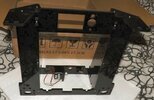
DSCF4008.JPG
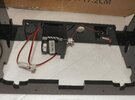
DSCF4009.JPG
Y-axis stepper motor & limit switch
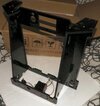
DSCF4010.JPG
Difficult to take photos, as it's all shiny black & no contrast between parts;
Next will be installation of the Y-axis guide rods, build plate and Y-axis belt.
For those wondering, X-axis is left to right, Y-axis is front to back & Z-axis is down to up
Might be it, until Tuesday - other things to do tomorrow
Dave
 
Thread owner
A lot of very fiddly little nuts, bolts and screws, taking me longer than I originally thought ( not that it matters...... ) - luckily all the fasteners are steel, so a sweep with my magnet on a stick recaptured any escapees.
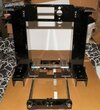
DSCF4012.JPG
It's beginning to take shape. One thing I do need is some dry grease for the build plate linear bearings, it runs very smoothly ( the aluminium 'H' shaped piece ) but a little lubrication will help - I've ordered some fancy PTFE grease, and so have gone £1.15 over my £100 budget ( so far ). Trawling the internet, there are loads of bolt on goodies, which might be very nice, but not on what is for me a trial machine. The only one I will consider is a magnetic build plate, but that's a bit further down the line.
Next up will be the Z-azis stepper motors, lead screws and guide rods
Dave
 
Thread owner
Well, further progress hot bed installed ( Pale yellowish-brown plate ) the Z-axis , X Axis and extruder
DSCF4032.JPG
It's getting a pretty heavy assembly, and I still have the power supply & the display to add.
You do have to be reasonably mechanically minded to assemble this - there's only so far the drawings & videos can go, and I've ended up scratching my head on a couple of occasions. What would be ideal would be for two people to put this together, as four hands would be useful at some stages..............
I've still to install the drive belts & the display - but that then leads to the wiring - OK, there are labelled wires, with plugs that go on the mainboard, that's not a problem. The main problem will be making it look tidy, and not something that's been thrown together. Not something I've done before, all wiring I've done before has been hidden behind panels or in conduits. Due to the extruder head moving in all three axes, the wires have to be loose enough to allow full movement, but not tangle with other bits & hopefully be tidy.
Dave
 
Very nice Dave. Amazing how “experimental“ these machines always look to me. I think it’s because all the working parts are on show.
 
Thread owner
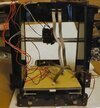
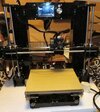
Another few hours' work - drive belts added ( a real two-man job, ideally ), with a great deal of swearing! Limit switches fitted, part cooling fan, and the display...............
DSCF4041.JPG
The back side - all those cables will be put inside spiral cable tidy, allowing for all the X,Y,Z axis movements

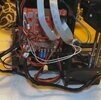
DSCF4043.JPG
All of those wires go to the mainboard that will be fitted to the right. The power supply goes to the left. I'm not happy about the mains power cable, it attaches directly to the three terminals on the power 'brick' - no strain relief, so a pull on the mains cord could damage something ( let alone an electrical hazard ). I've seen various ways of relieving this & ordered a few more bits - that £100 budget has been left behind :sad: Most of these are one-off costs, so can't be helped. It depends on how my cable tidying goes, but I hope to become operational towards the end of the week
Dave
Dave
 
Almost there Dave. I see what you mean about all the wiring. I'm sure it will look much less like wayward spaghetti when you've finished :smiling:
 
Thread owner
Almost there Dave. I see what you mean about all the wiring. I'm sure it will look much less like wayward spaghetti when you've finished :smiling:
The guy in the video of the printer assembly makes it look easy - I wonder how many printers he'd made before?
Dave
 
Thread owner
Power supply & mainboard added, very fiddly lost count of how may times I dropped one of the tiny nuts, just as well they're steel, as the magnet soon picks them up.
The next & final job is the wiring - I've located all the wires with labelled plugs & where they plug in, now it's how to do it as neatly as possible, bearing in mind that the extruder head moves, there are hot bits, and I'm pretty sure there is an ideal sequence to plug the wires into the mainboard. However, my mainboard is a revised model to the one in the assembly video ( there is a note to this effect with the board ) and that might cause me to scratch my head a bit. Hopefully, I can get this done tomorrow & then the real fun begins - the tweaking & learning phase. I'm not going to attempt to print anything of my own at first, I'm using tried & tested files from Thingiverse, so I know any problems are due to my setup & not the source files
Dave
 
Thread owner
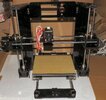
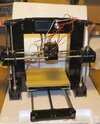
Finally finished -or as finished as it will be before testing!
DSCF4044.JPG
It's an awkward thing, heavy & lots of sharp edges
DSCF4047.JPG
Now, wiring the mainboard was quite easy, the plugs are labelled, as are the sockets. It looks a real mess.........................
DSCF4046.JPGThere is a cover plate that fits in front of all the wiring, but I'll not tempt fate by fitting it until I've found it all works. I need a few more cable ties to take up some of the slack.
Constructing this has been fiddly ( big hands -small parts ), but not too difficult - I've watched the assembly video a dozen times, you couldn't get it together just by the manual. You can assemble it with the tools provided - everything is in the box. The only things I've added is some grease for the guide rods/leadscrews. A pair of pliers and a torch are very useful, as well - a magnet to find small nuts is also handy.
I haven't had to fettle any parts, they all fitted well together - the only electrical thing I did was stripping wire insulation, as I substituted my own UK lead & plug for the US one supplied.
It does take some mechanical ability, and a bit of thinking to put together, but nothing that is rocket science. At times 2 pairs of hands would be very useful. It has given me an understanding on how a FDM printer fits together - the next chapter will be making it work!
Dave
 
Well done Dave. Bet you're excited to try it out. I know I'm looking forward to seeing something printed ;)
 
Thread owner
Now that I've finished it, I have to make some space for it's permanent home. I've decided I'm going to retire my scanner & inkjet printer - it's been a couple of years since I used the scanner, and almost as long for the printer - I simply don't use them these days - the internet & digital images have superseded them. I don't carry photos around, they're on my phone!
Dave
 
Back
Top