Theme editor

Scale Model Shop

Customising supplied figures

lb483

New member
Joined
Jan 21, 2022
Messages
15
Reaction score
0
Points
0
1/3
Thread owner
Hi.

I have a Tamiya 1/12 Team Lotus Type 49 1967 and I'd like to paint the driver as Graham Hill. The supplied driver has a generic face so it's gonna need some modification - although I'm hoping that adding a moustache may be sufficient.

What's the recommended product for customising existing figures? Is it the same as recommended for fillers (in other posts) or do I need something more carve-able? If it all goes pear-shaped I may just have to mould a Nomex neck scarf (using whatever is recommended for customisation) and rely on the helmet design to identify the driver.

Thanks.
 
Cant really help with the figure - others no doubt will !
However I look forward to the build - have fun !!
 
Sorry no one has answered this , so going to bump it up .
Neil where are you ? :nerd:
 
Peter

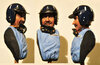
There are a number of products you could use. Green Stuff, and Magic Sculpt are two that are very commonly used. The below is a sculpt using Magic Sculpt. Although you won't need to go this far. Best of luck

Hill done.jpg

John
 
Sorry no one has answered this , so going to bump it up .
Neil where are you ? :nerd:
Sorry, guys, not paying attention:nerd:
As John says ,kneadatite green stuff, magicsculpt or milliput are the usual suspects. They all benefit from dampening modelling tools because the putty can be quite sticky. If you're a complete novice, check out the work of Bill Horan, who works wonders with green stuff ,albeit at 1/32 scale, but with home made tools like toothpicks. Should be transferable to a 1/12 scale moustache!
Good luck and let's see the results please.
 
Sorry, guys, not paying attention:nerd:
As John says ,kneadatite green stuff, magicsculpt or milliput are the usual suspects. They all benefit from dampening modelling tools because the putty can be quite sticky. If you're a complete novice, check out the work of Bill Horan, who works wonders with green stuff ,albeit at 1/32 scale, but with home made tools like toothpicks. Should be transferable to a 1/12 scale moustache!
Good luck and let's see the results please.
Thanks Neil.:nerd:
 
We have all the stuff but Green Stuff. :tired: If only it could be gotten locally. From what I see it works wonders for fine detail.

Cheers,
Richard
 
Thread owner
We have all the stuff but Green Stuff. :tired: If only it could be gotten locally. From what I see it works wonders for fine detail.

Cheers,
Richard
I ordered some from Amazon.
 
Thread owner
Good luck and let's see the results please.
Hi Neil; thanks for the advice to date.

I revisited the model today - I bought it YEARS ago - and I don't think the face is gonna require as much surgery as I remembered <phew>.

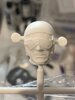
However... he's wearing goggles (selfish!) and I was wondering if there were any techniques for painting eyes behind goggles so they don't look like the eyes are on the outside of the goggles? I could carve back the front of the goggles (and add glass back in) but wondered if there were easier ways? Paint as normal and add a dark wash? I know it's only 1/12th but I don't really want to paint out the front of the goggles in black.

Head.jpg

Thanks again.
 
Peter

Graham hill used to cover the top of his goggles lenses with black tape, so that will solve half of the problem. For the rest I would carve away some of the plastic, paint the inside a dark flesh colour then fill in the space with some clear fill. You could do this with any of the following. Testors clear parts cement, gloss Mod Podge or best of all clear UV resin. BTW in your photo his helmet looks a little small to me, I would bulk that up a bit with either magic sculpt or milliput. You will find that Green Stuff is great for sculpting but it does not like to be sanded when you need to get a smooth hard finish.

John
 
Thread owner
Thanks again, John. Some really useful tips there.
 
Thread owner
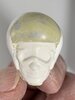
Post-sculpting, pre-painting stage. Helmet remodelled (maybe a little wide at the sides?), goggles carved away to permit painting and resin fill. Feedback appreciated.
0E988551-E392-4791-9CE5-C99BA9F09F11.jpeg
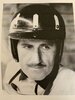
Reference photo for info:
C4BFFFA4-2D12-4F25-B018-5B1B16FA5C14.jpeg
 
Thread owner
Does anyone have any tips for softening Milliput for ease of moulding? I've read that you can use water but there's a risk of it getting trapped under the putty as it can't escape again. For fine moulding I've found it very dry and difficult to work with and had to resort to post-set carving :smiling2: Thanks.
 
Does anyone have any tips for softening Milliput for ease of moulding? I've read that you can use water but there's a risk of it getting trapped under the putty as it can't escape again. For fine moulding I've found it very dry and difficult to work with and had to resort to post-set carving :smiling2: Thanks.
The only thing I can think of is to warm it up before you mix it and then use it quite quickly. You can't really thin it like you would a clay. And be sure to use a release agent!
 
But then I wouldn't really recommend using Milliput for moulding....
Upon re-reading the thread, I wonder if you really mean modelling rather than moulding? I assume you want to model the eyes, in which case warming it up is still a good idea. Then use water to lubricate the modelling tools and you will be fine.
Don't be too mean with the amount of milliput you mix. It's tempting to only mix a tiny bit if you want a small sculpt. But it's more difficult to get a good 50/50 proportion with small amounts, which will affect the curing. With a larger blob ( half an inch of each) you will have less discrepancy between the two components and it will cure properly. If you get it wrong your Sculpt might never fully harden.
Good luck
N
 
Thread owner
Good luck
N
Thanks Neil. I've actually gone mad and have carved off the side of the helmet to try and recreate the shape - which includes a slight gap between the face and the helmet. So I'm looking to re-create the side of the helmet as a partially-connected part. Hence the "moulding" comment - although it's all just modelling :-)
 
Back
Top