

You are using an out of date browser. It may not display this or other websites correctly.
You should upgrade or use an alternative browser.
You should upgrade or use an alternative browser.
Testing thread
- Thread starter John
- Start date





 🛩
🛩


 🛢
🛢
Feeling your pain Bob for now I just look in to see what the lads are doing other than that I've a full stomach as well ,tried to add emoji but all that did was a thumbs down thing(see above)one last go  only tiny but hey emoji says it all. Dave
only tiny but hey emoji says it all. Dave
- Joined
- Mar 4, 2004
- Messages
- 4,822
1/3
Don’t use the picture icon on the left use the paperclip on the right, I made a post here
https://www.scalemodelling.co.uk/articles/1232811-uploading-images
https://www.scalemodelling.co.uk/articles/1232811-uploading-images
Can't get my head around how PC it all is dont understand the half of it old site i selected image from my album pressed yeh and it inserted it in to my build/blog all I do now is just look in to see what friends are up to and that it seems is a marathon compared to the old site seems me and Bob are the only ones that can't get our heads around it.
- Joined
- Mar 4, 2004
- Messages
- 4,822
1/3
David Lovell Hope this little video helps?
https://www.loom.com/share/999e9476250b48cdb18da8414a319bbc?sid=c422deff-707b-417f-b8b9-f576436aadf4
https://www.loom.com/share/999e9476250b48cdb18da8414a319bbc?sid=c422deff-707b-417f-b8b9-f576436aadf4




A_J_Rimmer
New member
1/3
Trying to figure out how to post photos using my image links from Postimage...

Okayyyyy so that worked - so why didn't it work in the on your bench thread....? It kept crashing and calling it a incorrect format.
Okayyyyy so that worked - so why didn't it work in the on your bench thread....? It kept crashing and calling it a incorrect format.
A_J_Rimmer
New member
1/3
Hi John - When I uploaded it to Postimage, it was a normal jpeg. Once I pasted the link into the image box, it either crashed and said page not responding or said the image was the wrong format (which is surprising given it's just a link).
Having posted this up - I tried again on the on the bench thread and it worked - so not sure what happened. Maybe I used the wrong link possibly. I've not had an issue with using postimage here before, so I assume it's me just getting used to the new system. I'll try a few more and see how I get on, so don't worry too much about it now.
Cheers and thanks for asking.
Having posted this up - I tried again on the on the bench thread and it worked - so not sure what happened. Maybe I used the wrong link possibly. I've not had an issue with using postimage here before, so I assume it's me just getting used to the new system. I'll try a few more and see how I get on, so don't worry too much about it now.
Cheers and thanks for asking.
A_J_Rimmer
New member
1/3
Just trying a direct upload rather than going through postimage - I seem to be having a lot of issues with them of late, so it might not be a problem this end.
Bit of a faff - I had to change the settings to stop it from thinking it was a URL... but it worked! I might do this in future as I'm finding the aforementioned Postimage a bit flaky.
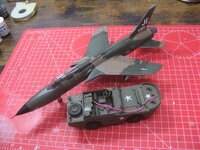
Bit of a faff - I had to change the settings to stop it from thinking it was a URL... but it worked! I might do this in future as I'm finding the aforementioned Postimage a bit flaky.

I gave up on image servers years ago. I upload from my PC. sort of....
Take the photo on smart phone, send them to one drive, Up load them from my PC then 'Clear space' sending the photo on my PC back to one drive. LOL. Not near as bad as it sounds.
Take the photo on smart phone, send them to one drive, Up load them from my PC then 'Clear space' sending the photo on my PC back to one drive. LOL. Not near as bad as it sounds.

I do similar Ian, using Dropbox. Any photos I take automatically sync with my PC and tablet. I get 2.8GB free, so every now & then I clear out the folder to a backup one on my desktop.



Ive noticed this VB software has many more emojis then Xf and they are the same as my iPad.
Wondering if my iPad emojis can be seen by users of pc / android ?
here are some of the emojis entered from my iPad keyboard ️
️


 ….can everyone see them?
Wondering if my iPad emojis can be seen by users of pc / android ?
here are some of the emojis entered from my iPad keyboard
️….can everyone see them? Legal Notice
scalemodelling.co.uk is a privately operated online discussion forum. All content posted by members reflects their own views and opinions and does not necessarily represent those of the forum owners or administrators. While reasonable efforts are made to moderate content, no responsibility is accepted for user-generated material. By using this site, you agree to comply with UK law and the forum rules.