Theme editor

Scale Model Shop

FDM PLA 3D printing - with a model making inclination

sigh - it looks like my printer purchase from China has vanished - it was supposedly despachted from China, but now has disappeared............... I must admit that the price was a bit too good! Oh well - between PayPal & AliExpress I should eventually get my money back. Odd thing is that the Voxelab Aquila X2 seems to have become very scarce! So it's back to searching the 'net for a good price!
I'm prepared to wait, the Anet is still making its' chuntering noise in the background!
I changed filaments & used a PLA+, which is supposed to be a bit stronger than ordinary PLA, it printed at a slightly higher temperature - but Oh Dear - the print quality was abysmal. warping & stringing - I've been altering the settings in the slicer, and I think its' improved a lot. I wish I'd stuck to normal PLA! Trying new things doesn't always work. Not a very successful week or so!
Dave
Well that's the best thing about using PayPal Dave, whenever had a problem they have always come up trumps. Sorry to read of this, you look fwd to receiving and then this.
 
Thread owner
I didn't say anything, but that was way too cheap to be anything other than a 2nd hand unit or fake ...... something that WISH and some people on AliExpress seem very good at doing.
As far as I can tell the Aquila C2 was discontinued ages ago , it didn't sell well, it was a cut down Aquila X2

A review I found had the following "The C2 is a lesser machine. It has lower grade stepper drivers, which are noisy. No one recommends this machine. No user base, no support. Don't buy."
The Aquila is the X2 minus a $2.00 filament out sensor.
If any, go with the regular Aquila. If you get one with an H32 board (there's a sticker on the machine itself), pack it back up and send it back. That chip is a cheap Chinese clone that has problems, and (currently) has no support.
The Aquila S2, C2 & X2 are still for sale on the Voxelab website - prices are high & shipping extra - most reviews are positive - if you look for negative reviews, you will find them! Every machine has its' pros and cons, and if you wait for the perfect machine you'll never buy one!
I've been looking instead at the Sunlu T3, it seems to tick the boxes, albeit at a higher price ( probably more realistic! )
Dave
 
Thread owner
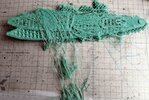
This is what happens when a print fails several hours after starting! This is one solid mass.
DSCF4363.JPG
I watched the first few layers go down & it looked OK............I came back 3 hours later to find this! It seems that one end of the print came unstuck & started to warp, this caused the print head to catch & eventually caused the whole print to come adrift!
This is with the PLA+ filament that I have been having problems with, poor quality prints & not sticking to the build plate - I've put this back in it's box & started a new spool of standard PLA. I'll try the green stuff in the Monoprice printer when that runs out. It could just be a bad spool!
On a more successful note, I've been printing some small parts,
DSCF4365.JPG
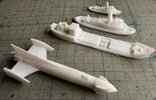
Back to front 1/700 tug, the same tug at 1/350, a coastal freighter at 1/350 - and at the front - one which only those of a certain age will recognise! - Scale ??
Dave
 
Ohh, Fireball XL5. I recognise the ship and remember absolutely nothing about the program……one for Boatman Chris I expect.
 
Thread owner
Ohh, Fireball XL5. I recognise the ship and remember absolutely nothing about the program……one for Boatman Chris I expect.
I looked for others in the same vein - I found the Thunderbirds ( but Bandai did those in plastic ), Seaview ( Voyage to the Bottom of the Sea - Aurora ) - I did find Stingray but either in a simple keyring model, or a large multi-part jobbie! Any number of Daleks - I found some from UFO - Skydiver & Moon Interceptors - quite a trip back to my youth ( no sign of Supercar, though! )
Dave
 
YES Dave i remember all these SUPERCAR an FIREBALL XL5 / STINGRAY/ CAPT SCARLETT /THUNDERBIRDS / UFO all brilliant programes for their time
chrisb
 
Thread owner
Bad printing day - a filament snapped - Luckily I was in the room & able to pause the print. I reloaded the filament & resumed the print. It seemed to be OK, but somehow the Z & Y axis had shifted - this caused the print head to hit the print & dislodge it, not straight away but after an hour. I scrapped the print, re - levelled the axes & started the print again. After about 1/2 hour I noticed that the filament spool wasn't turning - no extrusion. Stopped the print again - couldn't get it to extrude, so I had to dismantle the print head & found a small piece of filament blocking the extruder gears What should have taken about 3 hours to print still hasn't emerged & taken several hours to fix. Hopefully my luck will be better tomorrow!
It seems that I'm unable to change the filament without it causing Axes disturbances, having to level the axes & build plate every time. I still don't know why the filament snapped originally.....................
Luckily, since I assembled the printer, it's not a closed book, just a bit fiddly & tedious!
Dave
 
Thread owner
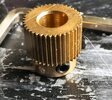
Ah - not as simple as I thought! I attempted to print, first thing, extrusion problems! I stripped everything down, and had a close look and found that the serrated extruder drive had slipped along the stepper motor shaft, and was no longer in alignment with all the other bits! It's held in place by 2 set screws. These had come loose!
DSCF4367.JPG
I had a spare, the same size ( above ), so I substituted this, cleaning all with IPA, and using a drop of threadlock . Reassembled and working well ( so far ). I have read about this on the 'net, so it was one of the things I was checking. I suspect this was the cause of my problems with the PLA+ filament, so I've now reloaded that.
I 'm not sure if these problems are confined to the DIY, or low-end printers, but if you don't have any patience, or a few problem solving skills, this could really put you off 3D printing!!
Dave
 
Thread owner
It seems like the problems I had with the PLA+ filament has been cured with the extruder fix, although it's still reluctant to stay on the bed! I had to raise the temperature to 65C.
I did find a nice model, although it illustrates a problem if you upscale a model.............
DSCF4369.JPG
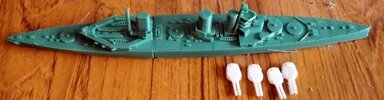
HMS Queen Mary in 1/700 ( lost at Jutland 1916 ). The model was actually scaled at 1/1500 & I scaled it up to 1/700, the hull is just over 300mm long ( I had to split it in two, to fit the build plate ). The hull has scaled nicely - it took over 12 hours to print both parts - but the turrets? Designed to print at 1/1500, the barrels are way overscale! Not a major problem, the turrets look the right size, so some barrel replacements are called for. The FDM printer can't print to the same fineness as a resin printer, but a bit of scratching is good for the soul.................
Dave
 
It seems like the problems I had with the PLA+ filament has been cured with the extruder fix, although it's still reluctant to stay on the bed! I had to raise the temperature to 65C.
I did find a nice model, although it illustrates a problem if you upscale a model.............

HMS Queen Mary in 1/700 ( lost at Jutland 1916 ). The model was actually scaled at 1/1500 & I scaled it up to 1/700, the hull is just over 300mm long ( I had to split it in two, to fit the build plate ). The hull has scaled nicely - it took over 12 hours to print both parts - but the turrets? Designed to print at 1/1500, the barrels are way overscale! Not a major problem, the turrets look the right size, so some barrel replacements are called for. The FDM printer can't print to the same fineness as a resin printer, but a bit of scratching is good for the soul.................
Dave
That looks good Dave. Better looking ship than Hood in my opinion.
 
https://www.myminifactory.com/object/3d-print-hms-tiger-1913-200273

https://grabcad.com/library/hms-tiger-r-c-model-1

This is my version of the HMS Tiger UK Battlecruiser from 1913, designed as a 1/200 scale 2 Channel R/C controlled model. The primary reason for the design was to test the possibility of making model ship hulls from 3D printer parts. The model hull has been printed, assembled, as can be seen from the images, tested and performance is above expectations. The detail has been kept simple but more can be added if required.


https://cults3d.com/en/3d-model/game/hms-tiger
 
Thread owner
Gary, thanks for those - I'd seen two of them - but "this model is designed in the 1/1800 scale but can be printed in 1/2400 scale without appreciable loss of detail. " - Bumping it up to 1/700 wouldn't look too good. Similarly the others are designed to be printed at 1/2400 - the GrabCad site requires you to register as an active working designer to access the files- I get enough spam emails & sales calls as it is! I'm still looking - you can but hope!, after all the Queen Mary was a 1/1500 scale model, but was good enough to enlarge ( apart from the turrets )
Cheers Dave
 
Thread owner
Had a peculiar failure last night. I'd started a print, and I like to watch the first layers going down. To my surprise, the printer drew a few straight lines ( should have been curved ), then went away & sat in one corner - where there shouldn't have been any print at all............... Restarted the print, and a a similar thing happened. I thought that this must be a software slicing problem, so I resliced the model & tried again - the same happened, although it did draw a few more lines - I rebooted the printer, but - nope.
I realised the common feature was the micro sd card - I replaced it with another - result, printing straightaway. I've had micro sd cards fail, but they seem to fail completely - this one was garbling the code. The card looked normal - the contacts were clean and straight. It was a 4Gb card, small by todays' standards - I've quite a few cards spare, so that went into the bin. Very odd - wasted an hour or so of my time!
Dave
 
Had a peculiar failure last night. I'd started a print, and I like to watch the first layers going down. To my surprise, the printer drew a few straight lines ( should have been curved ), then went away & sat in one corner - where there shouldn't have been any print at all............... Restarted the print, and a a similar thing happened. I thought that this must be a software slicing problem, so I resliced the model & tried again - the same happened, although it did draw a few more lines - I rebooted the printer, but - nope.
I realised the common feature was the micro sd card - I replaced it with another - result, printing straightaway. I've had micro sd cards fail, but they seem to fail completely - this one was garbling the code. The card looked normal - the contacts were clean and straight. It was a 4Gb card, small by todays' standards - I've quite a few cards spare, so that went into the bin. Very odd - wasted an hour or so of my time!
Dave
If you can retrieve it from the bin, try using RUFUS to analyse and reformat.
If it is a good make they can usually be recovered, its the cheap no-names that tend to fail most often.
 
Thread owner
If you can retrieve it from the bin, try using RUFUS to analyse and reformat.
If it is a good make they can usually be recovered, its the cheap no-names that tend to fail most often.
It was a card I'd used before in a smartphone, a couple of years ago - I analysed it & reformatted it, but it came up with no errors - I'm not wasting time testing it in the printer. I might try it in my MP4 player, that only has a 2Gb card in it!
Dave
STOP PRESS I've just had a delivery from Yodel - my Sunlu T3 printer has arrived - I know what I'll be doing for the rest of the day!
 
A very valuable side effect of your 3D printing adventure, Dave, is it's keeping you occupied :smiling:
..... and keeping us entertained!
 
Back
Top