Theme editor

Scale Model Shop

Nerdy Scale Model Spreadsheet, what to include?

pjgtech

Peter in Kent UK
SMF Supporters
Joined
Dec 28, 2023
Messages
2,039
Reaction score
2,181
Points
113
Age
61
Location
Swale Kent UK
First Name
Peter
1/3
Thread owner
Someone else on the forum mentioned counting up their model kits and it occurred to me that keeping a spreadsheet could be a good idea and a good record.

NB: I have always been a bit nerdy/geeky, and into IT and computers, and have used many spreadsheets over the years, both at home and at work.
So I started to produce a little spreadsheet of my current stash, and previously built kits, (from recent past, not going back to when I was a kid! Lol...)

I have so far produced a basic spreadsheet (only 20 odd models on the spreadsheet as of now), but just had a quick count up and I have another 61 in the stash to add, so 90 odd in total!).....so before I went any further I was now pondering what exact info to collect and record.

So far I have these on the columns on the list:

Kit name, (eg: Spitfire Mk1a, Tiger 1, etc)
Kit maker( eg: airfix,tamiya, etc)
Scale (eg: 1:12, 1:35, etc)
Kit type (eg: military vehicle, civilian plane, etc)
Date of purchase
Date of build/completion
Cost
Main Country of use
Main era of service/use

What others, if any, would you also record? Maybe the makers item/ref number for the kit?
 
Last edited:
Thread owner
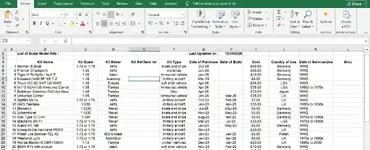
So far it looks like this.... as above, what would you add?
kit spreadsheet.webp

I have made some of the columns drop down lists, so you just click on a cell and select from a pre determined list, eg: Kit type, Country of use, Scale, etc, so you don't have to keep typeing stuff in, etc. Just makes it a bit quicker (once its been setup...)
 
Last edited:
Hi there Peter.

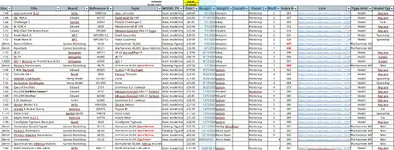
I think I was the culprit mentioning spreadsheets for controlling my stash. I actually use Scalemates are a database mechanism since it can export your stash as a .csv file while I import into excel and take the updated lines and copy to my control sheet, I have attached a screenshot.

Some of the columns have been hidden but putting it into Scalemates is excellent since it just controls the export of the info automatically.

I have a pending sheet and a completed sheet so I can see what I have pending and what I have ready to do next and I try to use the sum cost of pending to stop me buying more for my stash but since my stash is over £1000 at the moment, its a daily struggle not to buy more :(

Screenshot from 2026-04-12 15-23-28.webp
 
Thread owner
Thanx for that, I did not know you could export stuff from Scalemates. I do (occasionally) use Scalemates, so maybe that's a better way to go?
But I don't have all my kits on there.
Does it export lots of the info for you? or do you still have to enter it all first yourself?
As if thats the case, then I'd rather just use my own.
 
Thread owner
Just seen that you also have where you bought the kit from, so I'll add that column too to mine. Cheers
 
The only info I add is the cost, date of purchase, room of storage, shelf number and I use box number as a unique index code. Everything else including the handy hyperlink is from the .csv file from Scalemates. Everything else is supplied by Scalemates and its easy to find the model you want to control. It even does books, paints, brassin, whatever you can think of.

I tend to be really detail orientated and having a nice spreadsheet, well, it scratches a nice itch :)
 
I have a spreadsheet for my paints, mainly so I don't buy any duplicates.
One for my stash wouldn't be very extensive, it only numbers five in total.
Having anything outstanding to do drives me a bit crazy.
So I complete one model then move on, decided six is the limit at any given time.
 
I have one for my paints as well since I was doubling up, especially since I have a damn library of over 250 at the moment.

I am also going to start cataloguing things like glues, sprays and airbrush parts because I have a daft amount of spares at the moment and when I purchase something I am always adding something else on because I think at the time that I need it without checking.

The average cost per stash box is around £30 but I find that I need a more complicated model so I am looking at the 70 ~ 90 quid range but I am trying bring down the current stash I have.

Its a running joke in my family at the moment as to how many models I have waiting for me.
 
Thread owner
I have a spreadsheet for my paints, mainly so I don't buy any duplicates.
One for my stash wouldn't be very extensive, it only numbers five in total.
Having anything outstanding to do drives me a bit crazy.
So I complete one model then move on, decided six is the limit at any given time.
Lol, I wish I was as reserved and restricted as you, I think I had bought more than six models within the month of starting up the hobby! :LOL::LOL::LOL:
 
Thread owner
I have one for my paints as well since I was doubling up, especially since I have a damn library of over 250 at the moment.

I am also going to start cataloguing things like glues, sprays and airbrush parts because I have a daft amount of spares at the moment and when I purchase something I am always adding something else on because I think at the time that I need it without checking.

The average cost per stash box is around £30 but I find that I need a more complicated model so I am looking at the 70 ~ 90 quid range but I am trying bring down the current stash I have.

Its a running joke in my family at the moment as to how many models I have waiting for me.
Yep, I think I can see myself doing another spreadsheet for scale model "consumables" or similar.
Like you I have so many paints, thinners, adhesives, etc now and actually bought a jar of Tamiya paintn yesterday, cos I thought I was running out, only to find when I got home, that I already had a spare!
 
I have been using an MS Access database since 2006 to record my kits, as I had already been working professionally with databases and spreadsheets for twenty years before that. There are eight main tables -

Models_Completed
Models_Removed
Models_Sales
Models_Sold_22_23
Models_Sold_24_25
Models_Spares
Models_Stalled
Models_Stashed
Models_Under_Construction

Each table has 81 fields (half of which is information about the buying and selling of kits) and the entries often move between tables if selling, making or scrapping etc. I probably have a couple of hundred SQL queries set up for the database too which makes life so much easier, especially when extracting information. Occasionally, I will export to an Excel spreadsheet for financial work, but for the most part, I stick with Access. Whatever method you use, it is important to not make it too unmanageable, and filled with information that you do not ACTUALLY need.

At first, I also maintained tables for paints and aftermarket bits and bobs but after a while I decided that was too much. It seemed that more time was being spent maintaining the information than actual kit making. If I buy some aftermarket stuff for a kit, I make a note in the kit's remarks column. However, that is not foolproof as I sometimes make the kit without remembering the aftermarket stuff I have for it. Now I am resorting to putting the aftermarket bits and bobs within the kit boxes if possible.

Although I am disciplined in keeping the database up to date, A couple of times I have moved a kit from one storage box to another and forgotten to record the move. As a result I have "lost"two kits which are around somewhere, only I don't know where they are! I normally carry out an audit/stock take once a year - but only in the summer, as most of the kits are in one of my garden sheds!

Dave
 
Last edited:
I started doing this recently too using Numbers - mainly because I no longer want to have a Microsoft subscription for a few excel sheets.

So I created (so far) two main sheets, one for Models and one for paints, and because Numbers is great at pivot tables, I use them too. The Paint one is more detailed but they both need updating.

If you use any of the AI tools liek ChatGPT or Cursor, but you can also use Copilot, tell it what you want, and it will create the csv or xls template for you.
 
Notes about what was added or done outside of the instructions would be helpful.
 
Hi Dave,

I did consider a MS database since I'm fairlyish OK with Access programming but I have gone on a non-corpo kick recently and have gone Linux with Libre Office. The spreadsheet option is just as good as MS but I get the problem.

Knowing me, I too would probably end up programming more and more with the system rather than making models since I used to do it as part of a series of jobs.

I've ordered some storage boxes/drawers from Green Stuff World in order to sort out some of my items but the paint storage is a wonder and has really transformed my storage of paint situation which was getting out of hand and now stores the paint in a fifth of the space.
 
I use Scalemates. I do not wish to know how much I have spent over the years :oops:

I keep a basic build log for each build, noting the materials and modifications used. I used to note everything which was useful in my early efforts, but these days I jot the basics into a notebook. A paper notebook, yes, very 20th century :geek:
 
Back
Top