

You are using an out of date browser. It may not display this or other websites correctly.
You should upgrade or use an alternative browser.
You should upgrade or use an alternative browser.
Testing thread
- Thread starter John
- Start date


A_J_Rimmer
New member
1/3
Apologies chaps, I perhaps need to be clearer.
I know how to quote somebody's post, using the quote button - that's fine. What I find interesting is these 'comments' you can place on a post - I can see how you can have a conversation within the post using the comment button, but what I have seen in a few threads on here is where somebody has quoted someone elses 'comment' and its come out as a new 'quoted' post in the thread.
I'm trying to figure out that - how to quote a comment.
I'll see if I can find an example.
I know how to quote somebody's post, using the quote button - that's fine. What I find interesting is these 'comments' you can place on a post - I can see how you can have a conversation within the post using the comment button, but what I have seen in a few threads on here is where somebody has quoted someone elses 'comment' and its come out as a new 'quoted' post in the thread.
I'm trying to figure out that - how to quote a comment.
I'll see if I can find an example.

Hi Arnold,
Click on 'Comment' shown by the arrow in the screenshot below. Then type away as usual. This is for a desktop view. For a smartphone or iPad etc, there are three horizontal dots to the bottom right. Select that, the option for comment appears. The first post in a thread cannot be commented on. Hope this helps.
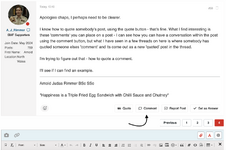
Click on 'Comment' shown by the arrow in the screenshot below. Then type away as usual. This is for a desktop view. For a smartphone or iPad etc, there are three horizontal dots to the bottom right. Select that, the option for comment appears. The first post in a thread cannot be commented on. Hope this helps.
Yep, exactly the same process. Good luck ArnoldOn smartphone/iPad it should be similar.

A_J_Rimmer
New member
1/3
What I did on desktop was to highlight the section I wanted to quote from my comment, a 'Quote' prompt appears. Easy. On smartphone/iPad it should be similar
Got it! Cheers mate, that's much appreciated!
A_J_Rimmer
New member
1/3
ll try to quote this comment as I've just re-read your query. I'm
I know the feeling lol!

To quote a part of a text, highlight the required part of the text and a little tab appears "quote" click that and the highlighted text gets inserted into the message wherever you have your cursor placed.
Just like the in the old software.
Just like the in the old software.
A_J_Rimmer
New member
1/3
1 comment
LOL! No problem - I've got the hang of it now - even on the PC! Cheers Mate and happy (and safe) travels. I hope you're off somewhere nice.
A_J_Rimmer
New member
1/3
To quote a part of a text, highlight the required part of the text and a little tab appears "quote" click that and the highlighted text gets inserted into the message wherever you have your cursor placed.
Just like the in the old software.
Thanks Ian - got the gist of it now.





1/3


Legal Notice
scalemodelling.co.uk is a privately operated online discussion forum. All content posted by members reflects their own views and opinions and does not necessarily represent those of the forum owners or administrators. While reasonable efforts are made to moderate content, no responsibility is accepted for user-generated material. By using this site, you agree to comply with UK law and the forum rules.