

You are using an out of date browser. It may not display this or other websites correctly.
You should upgrade or use an alternative browser.
You should upgrade or use an alternative browser.
A Different Direction..............
- Thread starter Dave Ward
- Start date


1/3
Good idea to take a step away for a while Dave.Given up on this for the weekend - started off in the wrong frame of mind this morning & just got more annoyed as I went on.
New week - new enthusiasm - I hope
Dave

..... You'll come back to it,refreshed and with a new approach, then you'll crack it in no time

Well, It's working!!!!!!!!!!!!!!
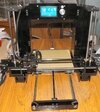
I wish I could say I found the fault & corrected it - well, I corrected it, whatever it was. I unplugged every plug, took off all the power connections ( yes I did check that the 230/120 switch was in the correct position - it was ). I cut off the ends of the mains wires stripped off the insulation & made new connections. The plugs were all replaced, making sure that they were all seated. Then - power on - fans started, the display came on, and to my surprise it beeped! ( wasn't expecting that! ). I then stupidly turned the printer round & gave myself a nasty AC shock - that'll be one of the first things I'm going to modify. The axes all moved smoothly, no graunching sounds, and it Auto-homed without crashing into the build plate.
I've got to go out for a memorial, so I won't actually be able print anything, but the whole evening awaits!
Relieved Dave
I wish I could say I found the fault & corrected it - well, I corrected it, whatever it was. I unplugged every plug, took off all the power connections ( yes I did check that the 230/120 switch was in the correct position - it was ). I cut off the ends of the mains wires stripped off the insulation & made new connections. The plugs were all replaced, making sure that they were all seated. Then - power on - fans started, the display came on, and to my surprise it beeped! ( wasn't expecting that! ). I then stupidly turned the printer round & gave myself a nasty AC shock - that'll be one of the first things I'm going to modify. The axes all moved smoothly, no graunching sounds, and it Auto-homed without crashing into the build plate.
I've got to go out for a memorial, so I won't actually be able print anything, but the whole evening awaits!
Relieved Dave

1/3
Lychee's new version of its slicer has anet settings for filament printers if you are still looking for a new ''cura''
Neil Merryweather
Active member
1/3
Don't pick too tall a print for the first one. You'll be waiting hours for it to finish :tears-of-joy: I usually run prints overnight anyway, but obviously you want to check it's running properly.
If the manufacturer supplies one or recommends one I would use that ,and any recommended settings because it will have been optimised already.
best of luck
If the manufacturer supplies one or recommends one I would use that ,and any recommended settings because it will have been optimised already.
best of luck
I've looked at the Anet supplied models - one is a plaque with chinese characters, and the other seems to be a sort of michelin man! I'll give those a miss!Don't pick too tall a print for the first one. You'll be waiting hours for it to finish :tears-of-joy: I usually run prints overnight anyway, but obviously you want to check it's running properly.
If the manufacturer supplies one or recommends one I would use that ,and any recommended settings because it will have been optimised already.
best of luck
Lychee's new version of its slicer
Thanks for that Gary, I'll take a look
Dave


- Joined
- Apr 27, 2018
- Messages
- 15,174
1/3
Glad to know all the issues have been resolved. Looking forward to seeing the results.

1/3
Well, bring on the first print then Dave…..all agog here!
I spent an hour or so last night 'levelling' the build plate, which seems simple in theory, but in practice is rather tricky. Eventually I got it right - then started to print - ha! The model just wouldn't stick! It would lay down a layer or two, then it would start dragging it around. I had several attempts. I was using PLA, at 200C Nozzle & 60C bed temperatures. This was the PLA supplied with the printer, and I've come to the conclusion it's rubbish!
I'm busy this morning, but this afternoon, or evening, I'll open a brand new 1kg spool of PLA filament & hopefully have a bit more success. I do know now, that all the bits work, the printer reads from the micro SD card, and responds to the gcode file, heating the nozzle & build plate to the right temperatures & extruding filament & making the appropriate movements - now all I have to do is make it stick! I have got a magnetic build plate coming, I don't like the tape style, it seems rather hit and miss
Dave
I'm busy this morning, but this afternoon, or evening, I'll open a brand new 1kg spool of PLA filament & hopefully have a bit more success. I do know now, that all the bits work, the printer reads from the micro SD card, and responds to the gcode file, heating the nozzle & build plate to the right temperatures & extruding filament & making the appropriate movements - now all I have to do is make it stick! I have got a magnetic build plate coming, I don't like the tape style, it seems rather hit and miss
Dave
Neil Merryweather
Active member
1/3
You could try hairspray Dave if the build plate is removable. Or pritt stick.I spent an hour or so last night 'levelling' the build plate, which seems simple in theory, but in practice is rather tricky. Eventually I got it right - then started to print - ha! The model just wouldn't stick! It would lay down a layer or two, then it would start dragging it around. I had several attempts. I was using PLA, at 200C Nozzle & 60C bed temperatures. This was the PLA supplied with the printer, and I've come to the conclusion it's rubbish!
I'm busy this morning, but this afternoon, or evening, I'll open a brand new 1kg spool of PLA filament & hopefully have a bit more success. I do know now, that all the bits work, the printer reads from the micro SD card, and responds to the gcode file, heating the nozzle & build plate to the right temperatures & extruding filament & making the appropriate movements - now all I have to do is make it stick! I have got a magnetic build plate coming, I don't like the tape style, it seems rather hit and miss
Dave
Be sure you don't have a tail of filament sticking up which catches the nozzle and rips the layers off
G
Guest
Guest
Good luck Dave, most would have given up by now
Neil Merryweather
Active member
1/3
Do you have the fan(s) set correctly? They are designed to cool down the printed filament, maybe the first layers are still too warm
Another tweak is the print speed, if you slow that down a bit it might give the first layers time to stick.
I've always said you need to be a tinkerer to get on with 3D printing....
Another tweak is the print speed, if you slow that down a bit it might give the first layers time to stick.
I've always said you need to be a tinkerer to get on with 3D printing....
There are so many settings in the slicer, that can affect adhesion, just a matter of getting the right combination - as you say - tinkering............Do you have the fan(s) set correctly? They are designed to cool down the printed filament, maybe the first layers are still too warm
Another tweak is the print speed, if you slow that down a bit it might give the first layers time to stick.
I've always said you need to be a tinkerer to get on with 3D printing....
Dave
1/3
Don’t know much about this process, but Neil’s tips sound worthwhile and your persistence is exemplary.
Just Yorkshire stubbornness ( some call it pigheaded )persistence is exemplary.
Dave
Legal Notice
scalemodelling.co.uk is a privately operated online discussion forum. All content posted by members reflects their own views and opinions and does not necessarily represent those of the forum owners or administrators. While reasonable efforts are made to moderate content, no responsibility is accepted for user-generated material. By using this site, you agree to comply with UK law and the forum rules.