Theme editor

Scale Model Shop

Adventures in resin 3D printing

Andy T

Active member
SMF Supporters
Joined
Apr 26, 2021
Messages
3,673
Reaction score
1,609
Points
113
Location
Sheffield
1/3
Thread owner
So, my son and I have purchased a resin 3D printer and I'm going to document how we're getting along with it. I'm struggling to find the time to post if I'm honest but I'll make a start and add to it as and when I can.

This is definitely not a how-to or tutorial as I'm a complete beginner myself, but hopefully it might help those that are thinking of taking the plunge to see how it goes right from the very start.

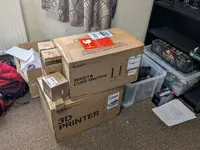
And this is how it started. I missed out on some extra Bank Holiday week discounts but around £400 got me a complete package of everything I needed, including 10l of IPA for cleaning.
1000005399.webp

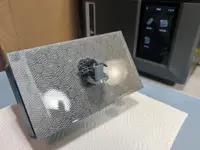
I could have spent less, the wash & cure machine isn't absolutely essential, but it seems much more elegant and efficient than other DIY options of washing the prints in a bucket of IPA then curing them in sunlight.

I also bought the wash & cure as separate machines as I had the desk space. If room is tight there are combination stations available that do both jobs but take a bit of reconfiguring between the two operations.

There was a small amount of assembly to do, mainly because everything is packaged separately to avoid damage in transit, but nothing that would tax a modeller. I probably took around an hour unpacking, assembling, and positioning it all, the hardest part being ferreting under my desk to run the cables neatly.

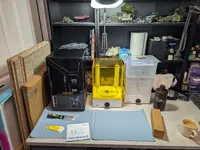
On that point, this wash & cure combo share a cable, so I only needed two outlets for the three pieces of equipment.
1000005400.webp

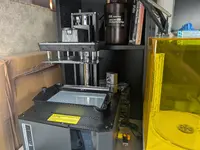
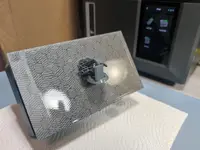
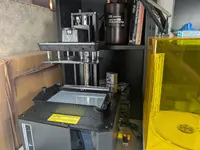
And this is the business end of the printer itself, with the UV protective cover removed. It will operate without it fitted but it's strongly recommended to keep it in place whenever possible to prevent stray UV from curing the resin in the vat at the bottom, or it getting contaminated with dust etc.
1000005497.webp

At the bottom you see the resin vat. On this model it moves around while printing (I'll get into why another time) and above you see the build plate, where the print actually forms, upside down.

All in all it was around 90 minutes before I set my first test print going, a file from the supplied USB stick. It could have been much faster if I'd not bothered getting the other machines in place too, or setting up the WiFi, software, firmware updates etc, but I was in no rush.

This particular machine - Elegoo Mars 5 Ultra is very beginner friendly so all set up steps are pretty much automatic, or explained very simply in the manual, so there's absolutely nothing to fear.

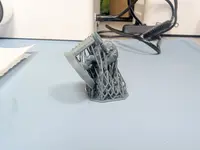
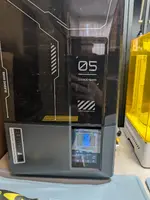
Here's the first print in progress
1000005403.webp

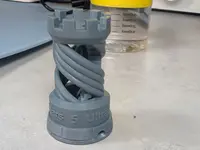
And the finished article, after about 2 hours of printing
1000005508.webp

It's around 2 inches high and much of the detail is hidden inside, with a spiral staircase and unsupported handrail. If this was a taste of things to come, I was excited!


I have much more to add but at least I've kicked off.

Very quick conclusions : So far it's a much more straightforward process than I'd imagined, but you need to be organised or it can get very messy, very quickly. After just a few prints though we'd got into a system that cuts the mess down dramatically.
 
I would like to know more about the resin used and the settings for wash and "dry" so to speak. I have owned my setup for a few years now and with no input from elsewhere I am not sure that I have used the best settings. Congrats!
Lee
 
Nice one andy , fascinating stuff . Its a great addition to the modellers arsenal , bit like resin moulding was when it first took off . Its way beyond me as my computer skills are non existant but the end product is definitely something I would use ( have done already in fact )
 
Thread owner
Thanks for joining me on my voyage of discovery chaps 😁

Remember I'm still an absolute beginner, fumbling my way around lol. A few successful prints are building my confidence though. I can't say the same for my son, Thomas, as he's had quite a few failures, but there are easily solvable reasons for those that I'll go into later (patience and trying to get clever 😂 )

Tony - the computer side has been pretty simple so far, although I've had to fire up my old PC as the software only works on windows or mac.

If I move into digitally sculpting my own prints that will be a whole different ball game. I might leave that to the young un.

At the moment you could liken what I'm doing to assembling a Spitfire kit, rather than completely scratch building one from plasticard, as I'm just taking someone else's design (legitimately) and turning it into a finished product.
 
Interesting, will deffo follow the progress. Looks like a nice setup.
Being a bit of an IT nerdy geek myself, and an ex CAD user, I have often looked at getting a 3D printer, but the tech seems to move on so fast and I can't really justify one as I don't really need one, but, then again that's never stopped me before! so maybe one day, Lol.
 
Thread owner
Thanks John, there's a learning curve but it isn't too steep thankfully.

Peter - yes, by the time I get comfortable with it there'll probably be a new model coming out 😂
I've tried to future proof a bit in that the post processing machines are much larger than is needed for the printer. If I decide to swap to a newer or larger printer in the future this wash & cure set up will handle the upgrade.

Famous last words where tech is concerned.... 🤣
 
Thread owner
The physical process

So what actually happens when you resin print something?

Once again, I'm still an absolute beginner so maybe some of my comments will raise a chuckle from the seasoned amongst us, but I'm just trying to pass things on as I learn. Please do correct me if I'm completely wrong about something though as I'd hate to lead people astray with my rookie ramblings 🙂

The actual process isn't too dissimilar from printing an image you've seen on the Web. You download the item and send it to the printer, where the magic (hopefully) happens.

There are a few more steps involved, which I'll go through in more detail when I cover the software, but briefly the model will need "slicing", or separating into layers, so the printer know what to do for each layer as the print builds up. Some items may also need "supports". Basically it will struggle to start printing a layer from thin air, so any overhangs or sticky - out bits need a framework to start from. Luckily the included software, Elegoo Satelite, can do this automatically for you, or more advanced users can tweak these things themselves. It's also really easy to resize an item, so if you've downloaded a file for 1/35 for example, you can easily scale it to 1/48, 1/72 or whatever is you're preferred flavour.

Back to the point of this post, I'll bring back this image:

1000005497.webp

Up at the top you can see the build plate, where the print is actually formed.

Below you'll see the vat or tank, filled (in my case) with grey resin. At the bottom of the tank is a clear plastic film, then underneath that is a UV LCD screen.

At the start of printing, the build plate is lowered into the vat/tank to just above the clear film. This distance corresponds to the thickness or height of the layer to be printed, which is adjustable between 0.01mm and 0.2mm on this particular machine. The default height is 0.05mm and I've not messed with that (yet!)

Once there is that thin layer of resin between the plate and film, the LCD fires a pattern of UV, determined by the slicing we did earlier, partly curing the resin and getting our print going. The build plate moves up by the layer height we've set (0.05mm in my case) and more resin flows into the gap created. I'll try not to get too involved for now but on this machine, the vat/tank also moves down and does a little shimmy, to help the resin flow into the gap more quickly and effectively.

This process repeats over and over, gradually building up layers of (partly) cured resin, until the print is finished.

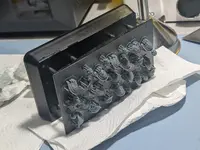
You end up with something like this, with an upside down figure stuck to the underside of the build plate. This particular plate is around 6 x 3 inches.

1000005496.webp

Be aware that since this assembly was dipping in and out of the resin tank, everything will be covered in a sticky stinky film, which is where the next episode, cleaning, comes in to play.

Note that cleaning has already been done in the picture above as no one on earth wants a sticky resin covered mess in one hand, with a camera in the other 😂

Thanks for bearing with me. I'm trying to make this as basic as I can but please ask any questions and I'll go find an expert to answer them!
 
Good for you mate. You seem to have sorted it out very well, I esp like the photo with the tea mug on the right !
I was lost after the first part, but it's all very clever and your description of comparing it to printing did make sense.
 
Thread owner
Thanks John, a nice cuppa always helps the grey matter to function. ☕
 
Thread owner
Post processing - Washing & Curing

So we have our sticky model, what now?

One way resin printing differs from filament is that it needs extra work after the printing has finished. Firstly we need to clean off any uncured resin that's stuck to the model.

There are resins that can be cleaned up with water, but since that water becomes hazardous and needs careful disposal I figured I may as well stick to more conventional resin, which is commonly cleaned with IPA.

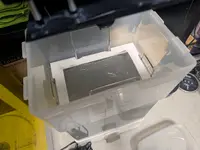
Cleaning can be done in a few ways but I've chosen a dedicated machine, which is basically a tank full of IPA with an impeller at the bottom to agitate the liquid to aid cleaning.

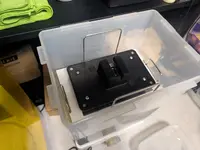
The print can be removed from the build plate and suspended in a basket. We started out doing this but it proved messy so my first modification was to cut up some thick plasticard and make an adapter.

1000005494.webp

This way, I can put the whole plate in the machine, with the print still attached, so both get cleaned at the same time.

1000005493.webp

Some machines will fit the plate directly but since I've gone for an oversized cleaning tank, this was a handy mod.

After a few minutes sloshing around the assembly is removed and left to drain off any excess IPA

1000005496.webp

The print can then be scraped off the plate

1000005498.webp

The next job is to remove the support structure. Not too dissimilar from cutting a part from a sprue, and I use similar nippers, or often finger strength is enough to break most off.

That leaves us with our print. I then gave it another quick wash in IPA to remove any uncured resin trapped by the supports, then it is left to dry completely before moving on. This is important as any IPA residue can stain the surface during the next procedure. Maybe not an issue if you're painting it anyway, but better safe than sorry.

1000005499.webp

I've mentioned a couple of times that the printer only partially cures the resin. It's enough to hold it together but if every layer was fully cured for 30 seconds or something, a print would take an absolute age as there could be hundreds or thousands of layers.

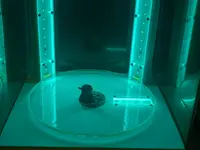
So the printer partly cures the resin to speed up the process, but then we fully cure the model afterwards. This can be as simple as leaving it in the sunlight, but since I'm in the UK I can't rely on that often, so a curing machine was also purchased.

Essentially a turntable and some UV lights, nothing complex

1000005500.webp

Timing of the cure is a bit of a variable, and subject to model size, resin type etc, so some experimenting is needed, but for the small things I'll be printing a few minutes is usually enough to make the surface feel hard and non-tacky

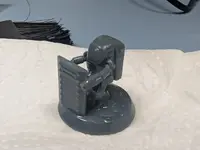
And there we have it, a finished print. It still needs a little scraping & sanding to remove the tiny remains of the supports, but nothing we aren't used to.

1000005501.webp

1000005502.webp
 
Back
Top