Theme editor

Scale Model Shop

HELP my photos are awful

scottie3158

SMF Supporters
Joined
Apr 27, 2018
Messages
14,684
Reaction score
1,130
Points
113
Location
Holbeach
1/3
Thread owner
I need help from those of you that can take a decent picture. I normally just leave my camera in auto. Even when I use my light box they are still terrible. If I want to select manual what f stops etc should i be looking for or is it not that easy. Please remember you are talking to someone who is photographically challenged.
 
Scottie, do you use an editing app? On my computer, by right-clicking on the image in the pictures file I am given access to several editing functions, the best being 'photos' which allows you to lighten, re-colour crop etc. I use it all the time.
 
Paul,
what camera are you using? - Could you put up some pictures, to illustrate what you mean?
Dave
 
Thread owner
Scottie, do you use an editing app? On my computer, by right-clicking on the image in the pictures file I am given access to several editing functions, the best being 'photos' which allows you to lighten, re-colour crop etc. I use it all the time.
Hi Peter I have GIMP 2 which I have used in the past. My problem is They are bad in the first place so would like to take decent ones so i don't have ti use them. But I guess that would be an option.
 
Thread owner
Paul,
what camera are you using? - Could you put up some pictures, to illustrate what you mean?
Dave
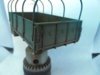
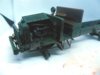
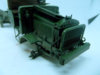
Dave it is a Fujifilm finepix s i think they refer to them as bridge cameras. As to pictures just look at my liberty b pictures you will see what i mean.
 
Dave it is a Fujifilm finepix s i think they refer to them as bridge cameras. As to pictures just look at my liberty b pictures you will see what i mean.
Just tried to pm you, let me know if it arrives.
Mike.
 
What kind of pictures do you want to take? I find that I can take model photos for posting to forums perfectly fine using my iPad, for example, but if you want extreme closeups, great depth of field, etc. then you’ll probably need a bit of a higher-end camera.

The trick to using an iPad (or phone) for model pictures is, I think, to not try to get in too close. Since the actual photos you take have a much greater number of pixels than you need when posting to a forum, you can take the photos from further away and then crop them to what you actually need — right there on the tablet or phone if you want. This makes it easier to take decent photos, because when you’re not as close in, you can get more of the model in focus.
 
Paul,
I use a Fuji Finepix SL240 Bridge Camera.........................

I've taken the Liberty ( get it? ) of taking two of your pictures & running them through my ancient PaintShopPro8.................scottie 01.JPGscottie 02.JPG
I used a simple Automatic Photo Enhance Feature it has brightened up the pictures quite a bit.
It could be that the camera is set to average metering - it may help to set it to 'spot' - its in the Photometry menu on the camera!
Dave
 
Scottie

All good advice here from the guys. I would add two things.

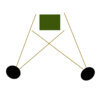
First up try to arrange your lights to have one on each side of the model lighting it like this.

scottie 1.jpg

You can use pretty much any sort of lights, for instance your desk lamp on one side and an led flashlight on the other.

Secondly check if you can set your own White balance, on the camera. Your pictures are consistently dark and with a blue cast. The white balance can change this to a more natural colour.

Finally I would look into Dave's suggestion of going to Spot metering rather than average. This will allow you to meter on one of the darker areas of the model and hence get a slightly longer exposure which in turn will lighten everything up.

Here is what I did in photoshop to increase the exposure a little and to balance out the blue cast. This is all better done in the camera as suggested above.

scottie.JPG

Good luck

John
 
Other tricks are as follows:
Use a high F number. This gives a larger depth of field so more of the image is in focus. A consequence of this will be that the exposure gets longer, so use a tripod and a remote release to stop camera shake. If you don’t have these, blue tac the camera to a suitable support and use the timer function. Don’t try to hand hold the camera as you won‘t keep it still.
Next, use a mid toned background. Using light or dark backgrounds fool the camera sensor into under or over exposing the image.....the sensor sets camera exposure so that the majority tone of the image is a mid grey. Photo shopping an image is useful, but it’s better to try and get the exposure right in the first instance....
Lastly, use the histogram....you need a good spread on this for a nice image....watch out for blown highlights as they are lost detail that cannot be retrieved. Better to shoot slightly under and brighten the image under post processing.....

cheers

Tim
 
Thread owner
Other tricks are as follows:
Use a high F number. This gives a larger depth of field so more of the image is in focus. A consequence of this will be that the exposure gets longer, so use a tripod and a remote release to stop camera shake. If you don’t have these, blue tac the camera to a suitable support and use the timer function. Don’t try to hand hold the camera as you won‘t keep it still.
Next, use a mid toned background. Using light or dark backgrounds fool the camera sensor into under or over exposing the image.....the sensor sets camera exposure so that the majority tone of the image is a mid grey. Photo shopping an image is useful, but it’s better to try and get the exposure right in the first instance....
Lastly, use the histogram....you need a good spread on this for a nice image....watch out for blown highlights as they are lost detail that cannot be retrieved. Better to shoot slightly under and brighten the image under post processing.....

cheers

Tim

Thanks Tim you have given me a lot to think about.
 
Everyones given you excellent tips so much so there is nothing to add except if you want to highlight any part just use a small white card or mirror to bounce light onto the part from your two main sources of lamp lights.

In photoshop I only use tone and color functions to balance for natural colors and only cut off total contrast and brighten if necessary. Tim has it right to watch out for blown highlights as this registers as nothing on pixels to to pick up or adjust from at post.

Cheers,
Richard
 
Paul, I just noticed that most of your photos are back lit causing dark shadows to the forground. Try to avoid that.

Cheers,
Richard
 
Paul, I hope the following doesn't come across as flippant but I know stuff all about camera settings and am a founder member of the 'Photographically Challenged Club'. My camera is always set on 'Auto', so it does all the thinking for me. I just press the button!
I never use a white background. That confuses the camera.

What I am passionate about is the composition of the picture. A little care makes all the difference to the presentation. So often I see the showing of superb models ruined by just plonking them on a table with either the garden furniture, the ironing board in the front room or something equally distracting in full view. Spare some thought to this aspect of your pictures too.
Once again, sorry I can't help re. actually taking pictures.

Yours.
Kodak Brownie
 
Paul

there has been a lot of talk about "white balance" - does that term actually mean anything to you?

If not - it basically means that the camera can adjust the way it exposes the images based on the kind of lighting.
If you use natural daylight it will look different to tungsten (old-fashioned filament bulbs) or LED lights.
Normally the "auto" setting will try to adjust the colour of the image based on what it thinks the light source is.

It gets complicated when you have two or more light sources - try not to mix tungsten/halogen/LED lights - especially if you have a
very light coloured background. You mention a light-box - does it have its own lights?

If you use a pale blue background and "auto" white balance the camera can get confused and try to treat the background as white so
everything gets a slightly brown cast.

Have a read of the camera manual about "White Balance"

But as others have said - put the camera on a good support (e.g a tripod / gorillapod or similar) and use the self timer to avoid camera-shake.

Make sure it has focussed on the subject before taking the shot.

Mark
 
Thread owner
Paul, I hope the following doesn't come across as flippant but I know stuff all about camera settings and am a founder member of the 'Photographically Challenged Club'. My camera is always set on 'Auto', so it does all the thinking for me. I just press the button!
I never use a white background. That confuses the camera.

What I am passionate about is the composition of the picture. A little care makes all the difference to the presentation. So often I see the showing of superb models ruined by just plonking them on a table with either the garden furniture, the ironing board in the front room or something equally distracting in full view. Spare some thought to this aspect of your pictures too.
Once again, sorry I can't help re. actually taking pictures.

Yours.
Kodak Brownie
Cheers Kodak, and your right on both counts I just set to auto and don't give much imagination to the pictures when they are taken. I need to look at both in the future although I doubt I will ever have the flair you have for excellent pictures.
 
Back
Top